
Overview
Gene-EmailSecurity is a comprehensive email threat intelligence gene that equips security teams with 18 specialized tools and 2 AI-powered prompts for investigating email-based threats. It aggregates intelligence from multiple free security APIs — EmailRep.io, HaveIBeenPwned, Hunter.io, AbuseIPDB, URLScan.io, and Google Safe Browsing — alongside DNS-based authentication checks, all accessible through a single Feluda Gene.
Security analysts, SOC teams, and incident responders can use Gene-EmailSecurity to:
- Investigate phishing attempts — Check sender reputation, analyze email headers, and detect suspicious patterns
- Validate email authentication — Verify SPF, DKIM, and DMARC records to prevent domain impersonation
- Detect compromised accounts — Check if email addresses appear in known data breaches
- Scan malicious URLs — Submit URLs for scanning and check against Google Safe Browsing
- Assess IP reputation — Evaluate email server IPs using AbuseIPDB
- Verify email validity — Detect disposable or temporary email addresses
What Makes This Gene Valuable
1. All Tools Use Free APIs
Every tool in Gene-EmailSecurity uses services with free tiers. You can sign up for API keys at no cost from EmailRep.io, HaveIBeenPwned, Hunter.io, AbuseIPDB, URLScan.io, and Google Safe Browsing. Eight tools work without any API keys at all.
2. AI Prompts Guide Investigations
The two AI prompts — phishingInvestigator and emailThreatAdvisor — provide structured investigation workflows. They guide you step by step through email threat analysis, ensuring you don't miss critical indicators even when you're under time pressure.
3. Comprehensive Coverage
With 18 tools covering email reputation, breach detection, URL scanning, IP reputation, DNS authentication, and header analysis, Gene-EmailSecurity provides a complete email security investigation toolkit in a single gene.
4. Real Data from Trusted Sources
Every tool returns live data from real, authoritative sources. No mock data. No simulations. You get actual threat intelligence from industry-standard services.
Available Tools
Gene-EmailSecurity provides 18 specialized tools organized by function:
Email Reputation (EmailRep.io)
emailReputation— Check individual email reputation and risk scoreemailBulkReputation— Check up to 100 emails at once
Data Breach Detection (HaveIBeenPwned)
breachCheck— Check if an email appears in data breachesgetAllBreaches— List all known data breaches
Email Verification (Hunter.io)
emailForwardCheck— Verify email addresses and detect disposable statusdomainEmailSearch— Search for emails associated with a domain
IP & URL Threat Intelligence
ipReputation— Check IP reputation using AbuseIPDBurlScan— Search for URL scan results via URLScan.iourlScanSubmit— Submit URLs for scanningsafeBrowsingCheck— Check URLs against Google Safe Browsing
DNS Authentication (No API Keys Required)
domainMXCheck— Check MX mail exchange recordsdomainTXTCheck— Check TXT recordsdomainSPFCheck— Check SPF (Sender Policy Framework) recordsdomainDKIMCheck— Check DKIM (DomainKeys Identified Mail) recordsdomainDMARCCheck— Check DMARC (Domain-based Message Authentication) records
Utility Tools (No API Keys Required)
ipGeolocation— Get IP geolocation dataemailHeaderAnalyze— Parse and analyze email headers for security indicatorsspfValidator— Validate SPF records and provide recommendations
AI Agent Prompts
phishingInvestigator
Guided workflow for investigating potential phishing emails. Provides step-by-step instructions for analyzing sender reputation, domain authenticity, and breach history.
Parameters:
email(required) — The sender email to investigatedomain(optional) — The sender domain to check
emailThreatAdvisor
Comprehensive threat assessment for email security concerns. Helps security teams understand the threat landscape and prioritize responses.
Parameters:
email(required) — The email address to analyzethreat_type(optional) — Type of threat: phishing, spam, malware, spoofing, or general
How Security Teams Use This Gene
Use Case 1: Phishing Investigation
- Run
phishingInvestigatorprompt with the suspicious email address - Follow the guided workflow to check sender reputation and domain validity
- Run
emailHeaderAnalyzeto parse email headers - Use
safeBrowsingCheckto verify any suspicious URLs - Document findings and recommend actions
Use Case 2: Domain Authentication Audit
- Run
domainSPFCheckto verify SPF records - Run
domainDKIMCheckto check DKIM configuration - Run
domainDMARCCheckto verify DMARC policies - Use
spfValidatorto get validation and recommendations - Implement fixes based on findings
Use Case 3: Incident Response
- Run
breachCheckto see if compromised accounts are involved - Run
ipReputationto assess email server IPs - Run
urlScanto analyze any malicious links - Use
emailThreatAdvisorfor comprehensive assessment - Block or quarantine based on findings
Getting Started
1. Configure API Keys in Feluda Vault
The following secrets need to be configured. All are free:
| Secret Name | Where to Get |
|---|---|
EMAILREP_API_KEY |
https://emailrep.io/signup |
HIBP_API_KEY |
https://haveibeenpwned.com/API/Key |
HUNTER_API_KEY |
https://hunter.io/signup |
ABUSEIPDB_API_KEY |
https://www.abuseipdb.com/register |
URLSCAN_API_KEY |
https://urlscan.io/user/signup |
SAFEBROWSING_API_KEY |
https://developers.google.com/safe-browsing/v4/get-started |
2. Deploy the Gene
Deploy Gene-EmailSecurity to your Feluda Genes folder using the deploy operation or by copying the Gene-EmailSecurity.feluda.ai file.
3. Start Investigating
Use the AI prompts for guided workflows or run individual tools directly in Feluda chat.
Key Benefits
- Free to use — All APIs offer free tiers with reasonable rate limits
- No code required — AI prompts guide users through investigations step by step
- Real data — All tools use live data from trusted security sources
- 18 tools in one gene — Comprehensive email security investigation toolkit
- Clear error messages — Tools tell you exactly what's missing if something isn't working
Limitations
- Rate limits apply to free API tiers (typically 45-1,000 requests per day)
- Some APIs require sign-up and API key configuration before use
- The DKIM check tries common selectors but may not find all DKIM records
- The traceroute simulation uses IP geolocation, not actual network-level traceroute
Next Steps
- Sign up for the free API keys listed above
- Configure the secrets in Feluda Vault
- Deploy Gene-EmailSecurity
- Test the tools with a known email address like
[email protected] - Explore the AI prompts for guided investigations
- Integrate the tools into your SOC workflows and RunFlows
Resources
Media
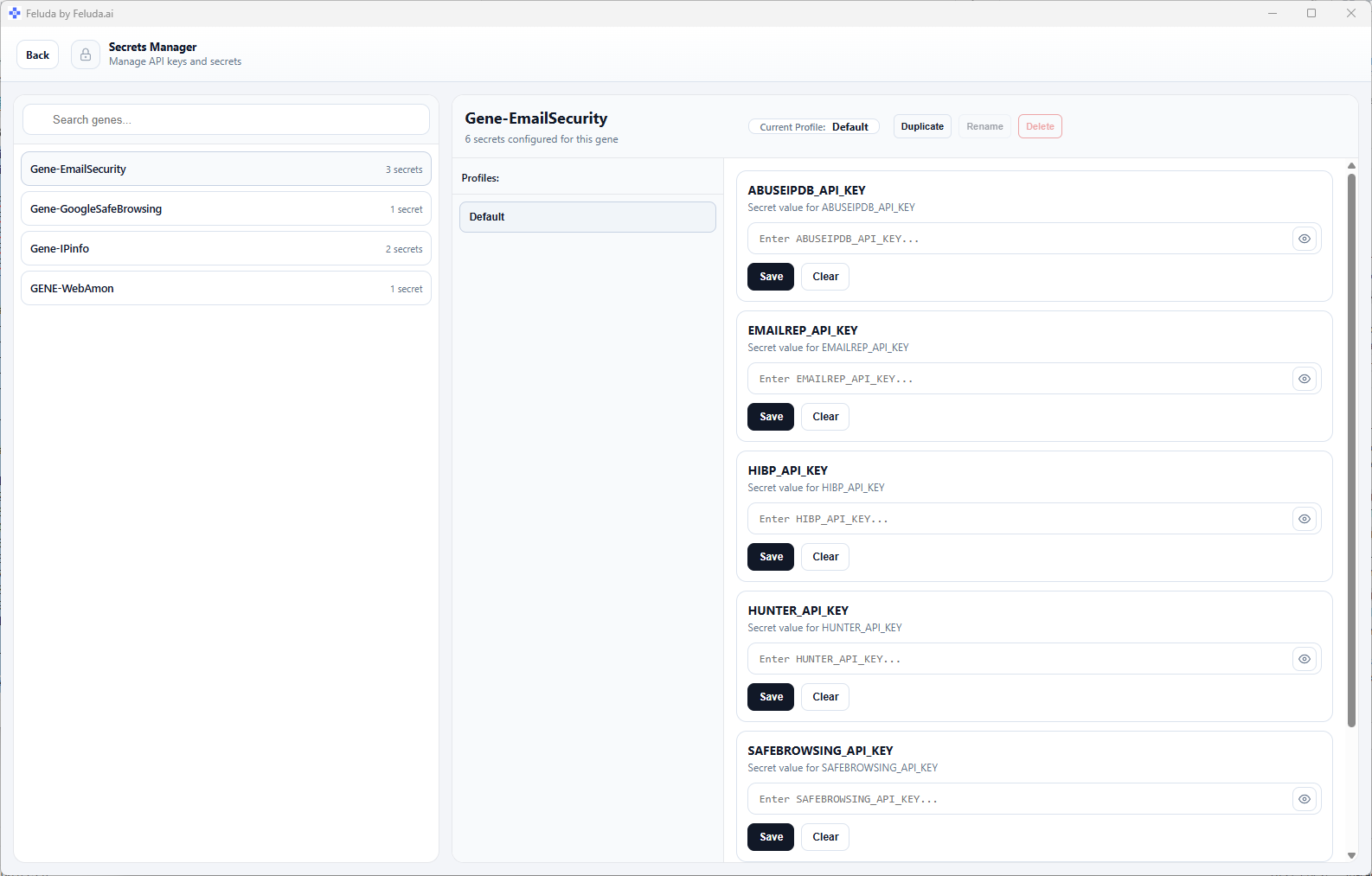

configuration
Frequently Asked Questions
- Do I need to pay for any of the APIs used by Gene-EmailSecurity?
- No. All APIs used by Gene-EmailSecurity offer free tiers. EmailRep.io, HaveIBeenPwned, Hunter.io, AbuseIPDB, URLScan.io, and Google Safe Browsing all provide free API keys with reasonable rate limits. The DNS and IP geolocation tools require no API keys at all.
- How long does it take to set up and start using this gene?
- Setup takes approximately 15-30 minutes. You'll need to sign up for free API keys from six services (EmailRep.io, HaveIBeenPwned, Hunter.io, AbuseIPDB, URLScan.io, and Google Safe Browsing), configure them in Feluda Vault, and deploy the gene. The AI prompts and DNS-based tools work immediately without any configuration.
- What types of email threats can this gene help investigate?
- The gene helps investigate phishing attempts, spam campaigns, malware distribution via email, email spoofing, domain impersonation, disposable email addresses, compromised accounts, and data breach exposure. It also validates email authentication records including SPF, DKIM, and DMARC.
- Can this gene be used by non-technical users?
- Yes. The AI prompts (phishingInvestigator and emailThreatAdvisor) provide guided workflows that walk users through investigations step by step. Users simply need to provide an email address or URL and follow the recommended actions. No programming or API knowledge is required.
- What happens if an API key is not configured?
- When a tool requires an API key that hasn't been configured, it returns a clear error message with instructions on where to sign up for the free key. This allows users to gradually configure the tools they need most, and the DNS-based and header analysis tools work without any keys at all.