
The MCP Fragmentation Problem
The Model Context Protocol (MCP) is the open standard that lets AI agents call external tools — search, file ops, APIs, databases, and more. Think of it as USB-C for AI. But today's MCP ecosystem is fragmented across platforms: Claude Desktop only runs on macOS and Windows (no Linux), Desktop Commander App only ships for macOS and Windows, and most community MCP servers need npx or Docker with different configs per OS. There's a better way.
⚠️ The current MCP landscape
- Claude Desktop — macOS & Windows only. No Linux.
- Desktop Commander App — macOS & Windows only. No Linux.
- Community MCP servers need npx + Node.js — different setup per OS
- Docker-based MCP needs platform-specific configuration (Docker Desktop + WSL2 on Windows)
- You end up with dozens or hundreds of separate processes
- Different credential storage per OS: .env files, env vars, no standard
- Workflows are not portable — configs differ across machines and teams
✅ Feluda: One MCP, every OS
- Native builds for Windows, macOS, and Linux
- Same endpoint:
localhost:42600/mcp - Same IDE config — identical
mcp.jsonon every OS - Same Genes (sandboxed tool packages) work everywhere
- Credentials in each OS's encrypted vault automatically
- .feluda.ai.flow files are fully portable between platforms
- No Node.js, no Python, no Docker on any platform
Three Platforms, One Experience
Feluda adapts to your OS while keeping everything else identical.
Windows
- Native installer + portable .exe
- AMD64 and ARM64 builds
- WebView2 Runtime (preinstalled)
- Gene sandboxing fills VS Code's gap
macOS
- Universal binary (Apple Silicon + Intel)
- No Rosetta needed
- WebKit-based (native WebView)
- Zero external dependencies
Linux
- AppImage, .deb, .rpm, Arch, binary
- x86-64 and ARM64
- GTK 3 + WebKitGTK 4.1
- X11 and Wayland supported
One Config, Every IDE, Every OS
The mcp.json config for Feluda is identical on Windows, macOS, and Linux. Commit it to your repository and every team member — regardless of their OS — connects to the same MCP server with the same tools.
{
  "servers": {
    "feluda": {
      "url": "http://localhost:42600/mcp",
      "type": "http"
    }
  },
  "inputs": []
}
This config works in VS Code, Cursor, Windsurf, JetBrains IDEs, and any MCP-compatible editor. For detailed IDE setup guides, see the MCP Server for Your IDE page.
Why One MCP Server Beats Hundreds
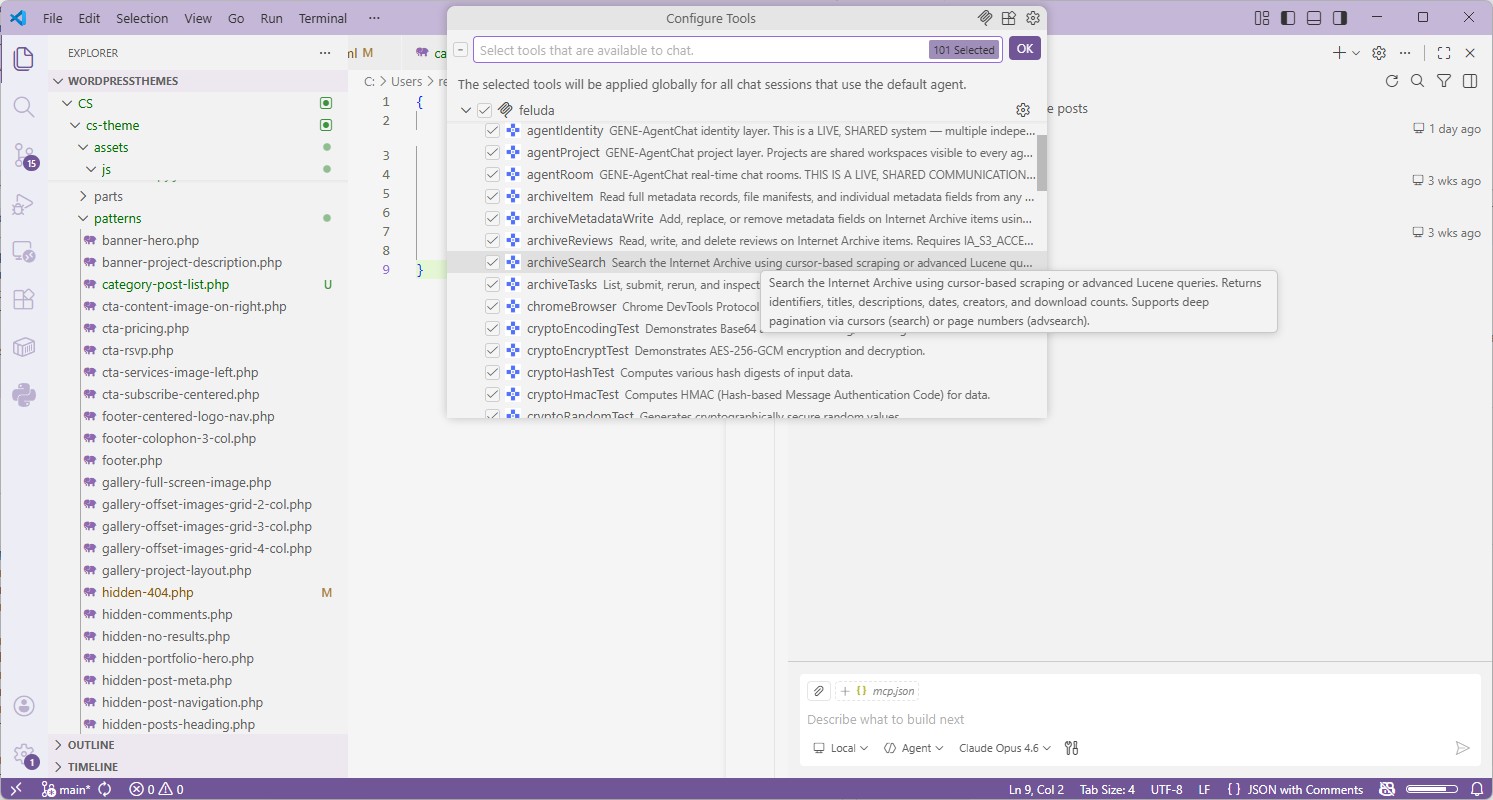
The MCP ecosystem has 18,000+ servers. You don't need them all running on your machine.
🧬 Genes: Sandboxed Tool Packages
Each Gene is a curated, sandboxed package that registers its tools with Feluda's built-in MCP server. Install Genes for web search, file ops, port scanning, API connectors — they all share one secure endpoint. No arbitrary code execution.
🎯 One Endpoint, Every Tool
Instead of managing dozens of separate MCP processes (each needing its own npx spawn, port, and config), all Feluda tools live behind a single HTTP endpoint at localhost:42600/mcp.
🔒 One Attack Surface
100 separate MCP servers = 100 potential vulnerabilities. One Feluda app with sandboxed Genes = one controlled, auditable surface. The math is clear: fewer processes, fewer risks.
🔑 OS-Native Secret Storage
Feluda automatically uses each operating system's built-in encrypted credential store to protect your API keys. No plain-text configs, no environment variables. AI models never see your secrets — they're injected at runtime.
📦 Portable Workflows
.feluda.ai.flow files work on any OS. Share a workflow with a colleague on macOS while you're on Linux. Same Genes, same tools, same results. No platform-specific adjustments.
📋 Centralized Audit Trail
Every tool call is logged — timestamp, tool name, arguments, result. One log, not scattered across dozens of Node.js process outputs. Essential for compliance, debugging, and AI agent oversight.
🧮 The security math
If you install 100 individual MCP servers and each has just a 1% chance of containing a vulnerability, the probability that at least one is compromised is over 63% (1 − 0.99¹⁰⁰). With Feluda, you install one app with vetted, sandboxed tools. One attack surface. One update path. One audit log.
Cross-Platform MCP Server Comparison
Platform support across MCP desktop apps and server approaches.
| Feature | Feluda | Claude Desktop | npx MCP Servers | Docker MCP |
|---|---|---|---|---|
| Windows | ✓ Native | ✓ | ✓ via Node.js | ⚠ Docker Desktop + WSL2 |
| macOS | ✓ Universal binary | ✓ | ✓ via Node.js | ✓ |
| Linux | ✓ 5 formats | ✗ Not available | ✓ via Node.js | ✓ |
| ARM64 support | ✓ All platforms | ⚠ macOS only | ⚠ Package-dependent | ⚠ Multi-arch builds |
| Sandboxed tools | ✓ Gene sandboxing | ✗ npx-based | ✗ Full shell access | ✓ Container isolation |
| Same config across OS | ✓ Identical mcp.json | ⚠ Similar but OS-specific paths | ✗ OS-specific commands | ⚠ OS-specific Docker config |
| OS-native secrets | ✓ OS-encrypted vault | ✗ Env vars | ✗ Env vars / .env | ✗ Env vars |
| Connects to any IDE | ✓ HTTP endpoint | ✗ Claude-only | ⚠ stdio only | ⚠ Port mapping |
| Portable workflows | ✓ .feluda.ai.flow | ✗ | ✗ | ✗ |
| Visual flow builder | ✓ Studio | ✗ | ✗ | ✗ |
| Free tier | ✓ 3 tools/session | ✓ Limited | ✓ Open source | ✓ Open source |
Security That Works on Every Platform
Feluda's security model is consistent across all three operating systems. Genes are sandboxed. Credentials are encrypted. Tool calls are audited. This matters especially on Windows, where VS Code's built-in MCP sandbox is not available.
🛡️ Sandboxed on Every OS
Gene tools cannot execute arbitrary commands on your system — no exec(), no shell spawning, no filesystem access outside their scope. This is true on Windows, macOS, and Linux. No exceptions.
🔐 OS-Native Encryption
On every platform, Feluda stores your credentials in the operating system's own encrypted credential store — the same battle-tested encryption used by the OS itself. No API keys in .env files, no plaintext configs, no environment variables.
👁️ AI Never Sees Secrets
When a Gene tool needs an API key, Feluda injects it at runtime. The AI model never sees the raw credential value. This prevents accidental leakage through model outputs or logs.
📋 Unified Audit Log
Every tool invocation is logged with timestamp, tool name, and parameters. Same format on every OS. One centralized log instead of scattered across dozens of process outputs.
Frequently Asked Questions
What is the best cross-platform MCP server?
Feluda is the best cross-platform MCP server. It runs natively on Windows, macOS, and Linux with the same endpoint (localhost:42600/mcp), same config, and same sandboxed tools. Claude Desktop only supports macOS and Windows — not Linux.
Does the same mcp.json config work on all operating systems?
Yes. The config is identical: {"servers":{"feluda":{"url":"http://localhost:42600/mcp","type":"http"}},"inputs":[]}. Commit it to your repository and every team member connects automatically, regardless of their OS.
Which MCP desktop apps support all three operating systems?
Feluda is one of the only MCP desktop apps with native builds for all three platforms. Claude Desktop only supports macOS and Windows. Desktop Commander App only supports macOS and Windows. Most community MCP servers require npx or Docker, which work cross-platform but lack a desktop GUI and sandboxing.
Can I share workflows between operating systems?
Yes. Feluda's .feluda.ai.flow files are fully portable. Create a workflow on macOS, share it with a colleague on Windows, run it on a Linux CI machine — same Genes, same tools, same behavior.
How are credentials handled differently on each OS?
Feluda automatically uses each operating system's built-in encrypted credential store to protect your API keys. The same Gene works on all platforms — Feluda handles the OS-specific storage transparently. No plain-text configs, no environment variables. AI models never see the raw credentials.
Is Feluda MCP free on all platforms?
Yes. The Free plan includes the built-in MCP server with up to 3 tools per session on all platforms. Paid plans unlock more tools per session and the ability to connect custom MCP servers. See the pricing page for details.
One MCP Server. Every Desktop OS. Sandboxed.
Download Feluda for your platform. Connect your IDE. Use the same tools, same config, and same security model whether you're on Windows, macOS, or Linux.
Platform-Specific Guides
Best MCP Server for Windows →
Native installer, AMD64 + ARM64, VS Code sandbox gap, encrypted credential storage.
Best MCP Server for macOS →
Universal binary for Apple Silicon & Intel. Zero dependencies. Encrypted credential storage.
Best MCP Server for Linux →
AppImage, .deb, .rpm, Arch. GTK 3 native. Claude Desktop doesn't run on Linux — Feluda does.
MCP Server for Your IDE →
Detailed setup guides for VS Code, Trae.ai, Cursor, Windsurf, JetBrains, and more.