
Linux Is Left Behind by Most MCP Desktop Apps
The Model Context Protocol (MCP) is the open standard that lets AI agents call external tools — search the web, read files, scan networks, query databases. Think of it as a USB-C port for AI. But most MCP desktop apps ignore Linux entirely: Claude Desktop has no Linux build, and the Desktop Commander App only ships for macOS and Windows. If you run Linux, your MCP options have been limited to terminal-only setups with npx or Docker.
⚠️ MCP on Linux today
- Claude Desktop — no Linux build available
- Desktop Commander App — no Linux version
- Community MCP servers need npx or Docker, each with full shell access
- You end up with dozens of separate processes — each a potential vulnerability
- Credentials scattered across environment variables and plain-text config files
- No central dashboard, no audit trail, no tool management UI
✅ Feluda on Linux
- First-class Linux support — AppImage, .deb, .rpm, Arch package, standalone binary
- A single MCP endpoint at
localhost:42600/mcpserves dozens of tools - All tools via sandboxed Genes — no arbitrary code execution
- Credentials in your OS-encrypted credential store — never in plain text
- Works on X11 and Wayland — both display servers supported
- x86-64 and ARM64 builds available
Why Feluda Is the Best MCP Server for Linux
Designed for Linux from day one — not a bolted-on afterthought.
🐧 Five Installation Formats
Choose the format that fits your distro: AppImage (universal), .deb (Ubuntu/Debian), .rpm (Fedora/RHEL), Arch package, or standalone binary. Whatever your setup, Feluda installs cleanly.
🧬 One MCP, Dozens of Tools
Instead of juggling 50 individual MCP servers, install one Feluda app. Each Gene (a curated, sandboxed package) registers its tools with the built-in MCP server automatically. Web search, file ops, port scanning, journal writing — all through one endpoint.
🛡️ Sandboxed by Design
Feluda's Genes cannot run arbitrary commands on your system. Unlike npm-based MCP servers that get full shell access via npx, Feluda's tools operate within defined boundaries. Curated, tested, and safe.
🔑 Encrypted Credential Storage
API keys and credentials are stored in your Linux system's encrypted credential store. AI models never see your secrets; Feluda injects them securely at runtime.
🖥️ X11 & Wayland
Feluda works on both display servers out of the box. Built with GTK 3 and WebKitGTK 4.1 — standard components available on every modern Linux distribution.
⚡ HTTP Transport — Any IDE
Feluda serves MCP over standard HTTP at localhost:42600/mcp. Connect it to VS Code, Cursor, Windsurf, JetBrains, or any MCP-compatible editor. No stdio pipes, no fragile IPC.
One Secure MCP Server Replaces Hundreds
Every npx-based MCP server you install is a separate Node.js process with unrestricted access to your filesystem, network, and shell. Linux power users know the risks: a compromised npm package in a single MCP server can read your SSH keys, exfiltrate data, or install a backdoor. Feluda eliminates this entire risk category.
📦 Curated Gene Packages
Every Gene is reviewed and tested. You know exactly what tools you are installing, what external services they connect to, and what permissions they need. No hidden dependencies, no supply-chain surprises.
🔒 Sandboxed Execution
Genes cannot spawn processes, run shell commands, or access files outside their scope. This eliminates the attack class where a compromised MCP server gains root-level access to your system.
🔐 Encrypted Credential Storage
API keys are stored in your operating system's encrypted credential store — not in .env files or plaintext configs. No credentials are ever visible to other processes.
📋 Full Audit Trail
Every tool call is logged with timestamp, tool name, and arguments. Review exactly what your AI agent did. Critical for compliance, incident response, and forensics.
🧮 The math is simple
If you install 100 individual MCP servers and each has a 1% chance of a vulnerability, the probability that at least one is compromised is over 63%. With Feluda, you install one app with vetted, sandboxed tools. One attack surface instead of a hundred.
Linux MCP Server Comparison
How Feluda compares to other ways of running MCP tools on Linux.
| Feature | Feluda | npx MCP Servers | Docker MCP | Claude Desktop |
|---|---|---|---|---|
| Linux support | ✓ 5 formats | ✓ via Node.js | ✓ via Docker | ✗ No Linux build |
| Desktop GUI | ✓ GTK 3 native | ✗ Terminal only | ✗ Terminal only | ✗ Not available |
| Built-in tools | ✓ Via Genes | ✗ Each server separate | ✗ Each container separate | ✗ Not available |
| Sandboxed tools | ✓ Genes are sandboxed | ✗ Full shell access | ✓ Container isolation | ✗ Not available |
| Connects to any IDE | ✓ HTTP endpoint | ⚠ stdio only | ⚠ Needs port mapping | ✗ Not available |
| Encrypted credential storage | ✓ OS-encrypted vault | ✗ Env vars / .env files | ✗ Env vars | ✗ Not available |
| ARM64 support | ✓ Native binary | ⚠ Depends on packages | ⚠ Docker multi-arch | ✗ Not available |
| Visual flow builder | ✓ Studio | ✗ | ✗ | ✗ Not available |
| Free tier | ✓ 3 tools/session | ✓ Open source | ✓ Open source | ✗ Not available |
Linux System Requirements
| Operating System | Modern Linux with GTK 3 & WebKitGTK 4.1 (Ubuntu 22.04+, Debian 12+, Fedora 38+, Arch Linux) |
|---|---|
| Architecture | x86-64 (AMD64) or ARM64 (aarch64) |
| Display Server | X11 or Wayland |
| Disk Space | ~150 MB for the app, plus space for Genes, flows, and journal data |
| RAM | 4 GB minimum. 8 GB+ recommended with larger local AI models. |
| Dependencies | libgtk-3-0 and libwebkit2gtk-4.1-0 (or equivalents for your distro) |
| Internet | Required for cloud AI providers. Not required for local providers (Ollama, LM Studio). |
Install Feluda on Linux
Choose the format that fits your distribution.
🟠 AppImage (Universal)
Works on any distro. No installation needed.
chmod +x Feluda-x86_64.AppImage
./Feluda-x86_64.AppImage
🟣 Ubuntu / Debian (.deb)
Install with apt. Handles dependencies automatically.
sudo apt install -y libgtk-3-0 libwebkit2gtk-4.1-0
sudo apt install ./feluda_amd64.deb
🔵 Fedora / RHEL (.rpm)
Install with dnf.
sudo dnf install -y gtk3 webkit2gtk4.1
sudo dnf install ./feluda.x86_64.rpm
🟢 Arch Linux / Manjaro
Install with pacman.
sudo pacman -S gtk3 webkit2gtk-4.1
sudo pacman -U feluda-x86_64.pkg.tar.zst
After installation, launch Feluda from your application menu or run feluda in the terminal. The MCP server starts automatically — the endpoint is live at http://localhost:42600/mcp.
Connect Feluda MCP to Your IDE on Linux
The same config works in every MCP-compatible editor.
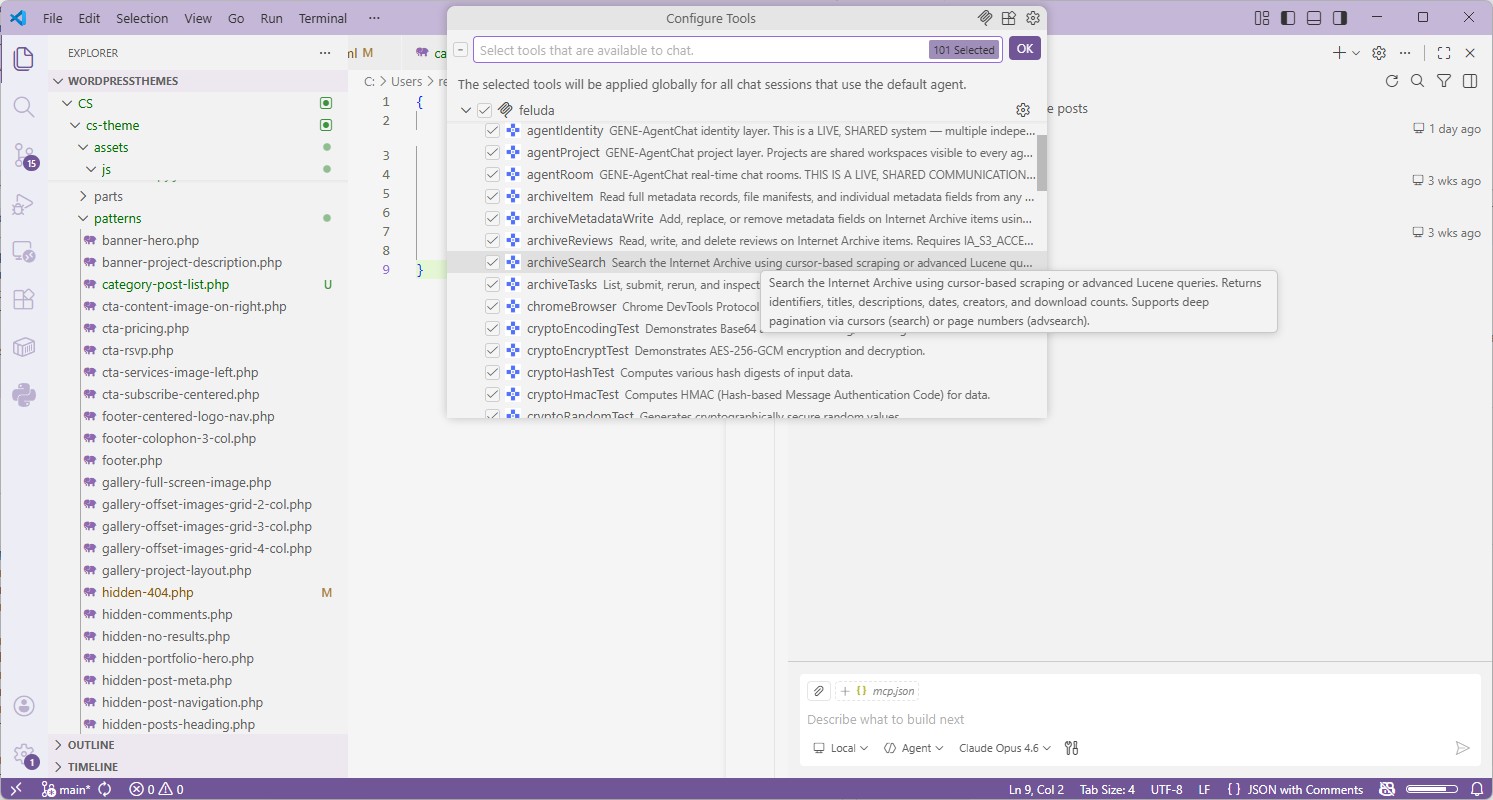
VS Code Visual Studio Code (GitHub Copilot)
- Make sure Feluda is running — the MCP server starts automatically on
localhost:42600. - Open (or create)
.vscode/mcp.jsonin your project root and paste the config below. - Open Copilot Chat in Agent mode. Click the tools icon — your Feluda tools appear in the list.
{
  "servers": {
    "feluda": {
      "url": "http://localhost:42600/mcp",
      "type": "http"
    }
  },
  "inputs": []
}
Cursor Cursor
- Open Cursor Settings → MCP.
- Click Add new global MCP server.
- Enter the URL
http://localhost:42600/mcpwith protocol HTTP. - Save. Cursor discovers all Feluda tools automatically.
Any IDE Generic Setup
- Find your editor's MCP server configuration (usually in settings or a JSON file).
- Add a new server of type HTTP with URL
http://localhost:42600/mcp. - Save and restart the AI agent session. Done.
Where Feluda Stores Data on Linux
| Application binary | /usr/local/bin/feluda (deb/rpm) or wherever you placed the AppImage |
|---|---|
| Desktop entry | /usr/share/applications/feluda.desktop |
| User data (flows, journals, Genes, settings) | ~/.config/Feluda/ or $XDG_CONFIG_HOME/Feluda/ |
| Secrets | OS-level encrypted credential store |
Frequently Asked Questions
What is the best MCP server for Linux?
Feluda is the best MCP server for Linux. It ships as AppImage, .deb, .rpm, and Arch package, includes a built-in MCP server with sandboxed tools, and is the only first-class MCP desktop app with a Linux build. Claude Desktop does not support Linux.
Does Claude Desktop work on Linux?
No. As of 2026, Anthropic's Claude Desktop app is only available for macOS and Windows. There is no Linux build or official workaround. Feluda is the alternative — a full-featured MCP desktop app that runs natively on Linux.
Which Linux distributions does Feluda support?
Feluda supports any modern distribution with GTK 3 and WebKitGTK 4.1. This includes Ubuntu 22.04+, Debian 12+, Fedora 38+, Arch Linux, Manjaro, openSUSE, and more. It works on both X11 and Wayland display servers.
Do I need Docker to run Feluda MCP on Linux?
No. Feluda is a native Linux application built with GTK 3 and WebKitGTK 4.1. The MCP server starts automatically. The only prerequisites are the two system libraries (libgtk-3-0 and libwebkit2gtk-4.1-0), which are standard on modern desktop distributions.
Are Feluda's tools safe to use on Linux?
Yes. Feluda's tools are delivered through Genes — sandboxed packages that cannot execute arbitrary commands on your system. Unlike MCP servers spawned via npx with full shell access, Feluda's Gene tools operate within defined boundaries. Secrets are stored in your OS-encrypted credential store, not in environment variables or config files.
Can I run Feluda on a headless Linux server?
Feluda is primarily a desktop application that uses GTK 3 for its UI. For headless server deployments, you would need a display server or use a virtual framebuffer (Xvfb). The MCP server endpoint is accessible from any networked client once Feluda is running.
Does Feluda also run on macOS and Windows?
Yes. Feluda is a cross-platform desktop app with native builds for Linux, macOS, and Windows. The MCP endpoint, config, and tools work identically on all three platforms. Learn more on the cross-platform MCP page.
Ready to Run MCP on Linux?
Download the AppImage, .deb, .rpm, or Arch package. Launch Feluda and connect your IDE in minutes. One MCP server. Dozens of sandboxed tools. True Linux support.
Explore More
Best MCP Server for macOS →
Universal binary for Apple Silicon and Intel. Zero dependencies. Encrypted credential storage.
Best MCP Server for Windows →
Native installer, AMD64 + ARM64 builds, encrypted credential storage.
Best Cross-Platform MCP Server →
Same endpoint, same tools, same config on Linux, macOS, and Windows.
MCP Server for Your IDE →
Detailed setup guides for VS Code, Trae.ai, Cursor, Windsurf, JetBrains, and more.