
The MCP Security Problem on Windows
The Model Context Protocol (MCP) gives AI agents the power to call external tools — search the web, read files, manage APIs. Think of it as USB-C for AI. But on Windows, users face a unique challenge: VS Code's built-in MCP sandbox is not available on Windows. This means every community MCP server you install via npx runs with full unrestricted access to your filesystem, registry, network, and shell.
⚠️ VS Code MCP Sandbox: Not Available on Windows
According to VS Code's official documentation, MCP server sandboxing is "currently not available on Windows". This means MCP servers you connect through VS Code on Windows have no isolation — they can read your files, execute commands, and access your network without restriction. Feluda solves this: its Gene tools are sandboxed by design, on every OS.
⚠️ MCP on Windows today
- VS Code sandbox — not available on Windows
- Community MCP servers need npx, giving Node.js full system access
- Some servers require Docker Desktop or WSL — heavy overhead
- You end up with dozens of separate processes — each a potential vulnerability
- Credentials in environment variables and .env files readable by any process
- Desktop Commander MCP has full shell access — intentionally bypasses security
✅ Feluda on Windows
- Native Windows installer (.exe) — AMD64 and ARM64
- Portable .exe option — no installation needed
- A single MCP endpoint at
localhost:42600/mcpserves dozens of tools - All tools via sandboxed Genes — no arbitrary code execution
- Credentials in your operating system's encrypted credential store — never in plain text
- Uses WebView2 Runtime — preinstalled on Windows 10/11
Why Feluda Is the Best MCP Server for Windows
A native Windows application with sandboxing that VS Code can't yet provide.
🪟 Native Windows Installer
Standard .exe installer with AMD64 and ARM64 builds. Uses WebView2 Runtime (preinstalled on Windows 10 build 17763+ and all Windows 11). No extra runtimes, no Docker, no WSL.
🧬 One MCP, Dozens of Tools
Stop installing 50 separate MCP servers. Feluda's Genes — curated, sandboxed packages — register their tools with the built-in MCP server automatically. Web search, file ops, port scanning, API connectors, and more through a single endpoint.
🛡️ Sandboxed Where VS Code Isn't
VS Code's MCP sandbox doesn't exist on Windows. Feluda's Genes cannot run arbitrary commands on your system. Unlike npm-based MCP servers that get full shell access via npx, Feluda's tools operate within defined boundaries.
🔑 Encrypted Credential Storage
API keys and credentials stored in your operating system's encrypted credential store — never in plain text, never in environment variables. AI models never see your secrets; Feluda injects them at runtime.
📦 Portable Mode Available
Don't want to install? Use the portable .exe — no registry changes, no system files. Run Feluda from a USB drive or any folder. Everything stays self-contained.
⚡ HTTP Transport — Any IDE
Feluda serves MCP over standard HTTP at localhost:42600/mcp. Connect VS Code, Cursor, Windsurf, JetBrains, or any MCP client. No stdio pipes, no named pipes, no fragile IPC.
One Secure MCP Server Replaces Hundreds
The current MCP ecosystem encourages you to install separate npm-based servers for each capability: one for web search, one for file operations, one for Git, one for databases. Each runs as its own Node.js process with unrestricted system access. On Windows — where VS Code can't sandbox these processes — this means every single server can read your Documents folder, access the registry, start PowerShell, and phone home. One vulnerable MCP server is all it takes.
📦 Curated Gene Packages
Every Gene is reviewed and tested. You know exactly what tools it provides, what services it connects to, and what permissions it needs. No hidden npm dependencies, no supply-chain surprises.
🔒 Sandboxed Execution
Genes cannot spawn processes, run shell commands, or access the Windows registry. No PowerShell execution, no reading arbitrary files. This eliminates the attack class that VS Code's missing sandbox leaves wide open.
🔐 Encrypted Credential Storage
API keys stored in your operating system's encrypted credential store — protected by your Windows login. No API keys in .env files, no plaintext configs, no environment variables visible to set.
📋 Full Audit Trail
Every tool call is logged with timestamp, tool name, and arguments. Review exactly what your AI agent did. Essential for compliance, incident response, and understanding behavior.
🧮 The math is simple
If you install 100 individual MCP servers and each has a 1% chance of a vulnerability, the probability that at least one is compromised is over 63%. With Feluda, you install one app with vetted, sandboxed tools. One attack surface instead of a hundred — and that one surface is sandboxed.
Windows MCP Server Comparison
How Feluda compares to other ways of running MCP tools on Windows.
| Feature | Feluda | npx MCP Servers | Docker MCP | Claude Desktop |
|---|---|---|---|---|
| Windows support | ✓ Native installer | ✓ via Node.js | ⚠ Docker Desktop + WSL2 | ✓ Windows app |
| ARM64 builds | ✓ Native | ⚠ Depends on packages | ⚠ Emulation | ✗ |
| Sandboxed tools | ✓ Gene sandboxing | ✗ Full shell access | ✓ Container isolation | ✗ npx-based |
| VS Code sandbox | ✓ Feluda is sandboxed | ✗ Not on Windows | ⚠ Container-level | ✗ Not on Windows |
| Credential storage | ✓ OS-encrypted vault | ✗ Env vars / .env | ✗ Env vars | ✗ Env vars |
| Connects to any IDE | ✓ HTTP endpoint | ⚠ stdio only | ⚠ Needs port mapping | ✗ Attached to Claude |
| Visual flow builder | ✓ Studio | ✗ | ✗ | ✗ |
| Portable mode | ✓ Portable .exe | ✗ Needs Node.js | ✗ Needs Docker | ✗ Needs install |
| Free tier | ✓ 3 tools/session | ✓ Open source | ✓ Open source | ✓ Limited |
Windows System Requirements
| Operating System | Windows 10 build 17763 (version 1809) or later, including all Windows 11 versions |
|---|---|
| Architecture | AMD64 (x86-64) or ARM64 (Snapdragon, etc.) |
| Runtime | WebView2 Runtime — preinstalled on Windows 10/11. Installer handles it automatically. |
| Disk Space | ~100 MB for the app, plus space for Genes, flows, and journal data |
| RAM | 4 GB minimum. 8 GB+ recommended with larger local AI models. |
| Dependencies | None. No Node.js, no Python, no Docker, no WSL. |
| Internet | Required for cloud AI providers. Not required for local providers (Ollama, LM Studio). |
Install Feluda on Windows
Two options: full installer or portable .exe.
Option A: Windows Installer (.exe)
- Download the installer from feluda.ai/download. Choose AMD64 or ARM64 for your system.
- Run the installer. It checks for WebView2 Runtime and installs it if missing. Follow the prompts — default settings are fine.
- Launch Feluda from the Start menu or desktop shortcut. The MCP server starts automatically on
localhost:42600.
Option B: Portable .exe
- Download the portable .exe from feluda.ai/download.
- Place it anywhere — desktop, USB drive, any folder. No installation needed.
- Double-click to launch. The MCP server starts automatically. Your data stays next to the executable.
Connect Feluda MCP to Your IDE on Windows
The same config works in every MCP-compatible editor.
VS Code Visual Studio Code (GitHub Copilot)
- Make sure Feluda is running — the MCP server starts automatically on
localhost:42600. - Open (or create)
.vscode\mcp.jsonin your project root and paste the config below. - Open Copilot Chat in Agent mode. Click the tools icon — your Feluda tools appear in the list.
{
  "servers": {
    "feluda": {
      "url": "http://localhost:42600/mcp",
      "type": "http"
    }
  },
  "inputs": []
}
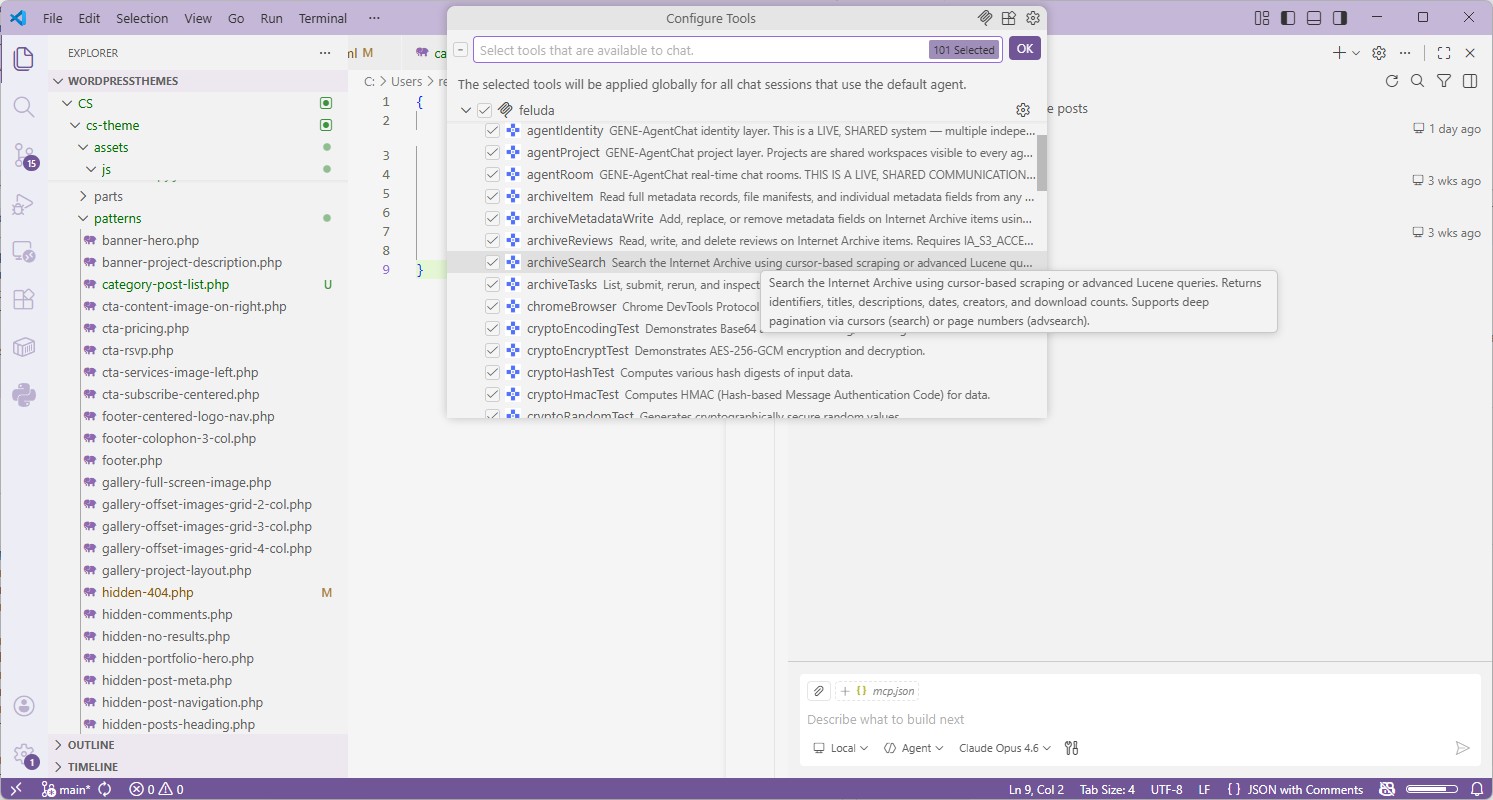
⚠️ Remember: VS Code MCP sandbox is not available on Windows
When you connect MCP servers in VS Code on Windows, VS Code's built-in sandbox does not protect you. This is why using Feluda matters — Feluda's Gene tools are sandboxed regardless of your IDE or operating system.
Cursor Cursor
- Open Cursor Settings → MCP.
- Click Add new global MCP server.
- Enter the URL
http://localhost:42600/mcpwith protocol HTTP. - Save. Cursor discovers all Feluda tools automatically.
Any IDE Generic Setup
- Find your editor's MCP server configuration (usually in settings or a JSON file).
- Add a new server of type HTTP with URL
http://localhost:42600/mcp. - Save and restart the AI agent session. Done.
Where Feluda Stores Data on Windows
| Application files | C:\Program Files\Feluda\ (installer) or wherever you placed the portable .exe |
|---|---|
| User data | %APPDATA%\Feluda\ — flows, journals, Genes, settings |
| Secrets | OS-level encrypted credential store (protected by your Windows login) |
| WebView2 cache | %LOCALAPPDATA%\Feluda\ |
Frequently Asked Questions
What is the best MCP server for Windows?
Feluda is the best MCP server for Windows. It installs natively, includes a built-in MCP server with sandboxed tools, stores credentials securely in your OS-encrypted vault, and provides the sandboxing that VS Code's MCP implementation currently lacks on Windows.
Does VS Code's MCP sandbox work on Windows?
No. According to VS Code's documentation, MCP server sandboxing is "currently not available on Windows." This means community MCP servers connected through VS Code on Windows have no isolation. Feluda's Gene tools are sandboxed by design, regardless of your IDE.
Do I need Docker or WSL to run MCP on Windows?
Not with Feluda. Feluda is a native Windows application that uses WebView2 (preinstalled on Windows 10/11). No Docker Desktop, no WSL, no Node.js. The MCP server starts automatically when you launch the app.
Does Feluda run on Windows on ARM?
Yes. Feluda provides native ARM64 builds for Windows on ARM devices, including Snapdragon-powered laptops and PCs. No emulation layer needed — it runs as a native ARM64 binary.
What is Desktop Commander MCP and why is Feluda safer?
Desktop Commander MCP is a popular community MCP server (5.6k+ GitHub stars) that intentionally provides full shell access — it lets AI agents run arbitrary commands on your system. Its own readme warns about security risks. Feluda's Gene tools are sandboxed: they cannot spawn processes, run shell commands, or access files outside their scope.
Is there a portable version that doesn't need installation?
Yes. Feluda offers a portable .exe that runs from any folder — desktop, USB drive, wherever. No registry changes, no system modifications. The MCP server works identically in portable mode.
Does Feluda also run on macOS and Linux?
Yes. Feluda is a cross-platform desktop app with native builds for Windows, macOS, and Linux. The MCP endpoint, config, and tools work identically. Learn more on the cross-platform MCP page.
Ready to Run MCP on Windows — With Actual Sandboxing?
Download the installer or grab the portable .exe. Connect your IDE in minutes. One MCP server. Dozens of sandboxed tools. The security that VS Code can't yet provide on Windows.
Explore More
Best MCP Server for macOS →
Universal binary for Apple Silicon and Intel. Zero dependencies. Encrypted credential storage.
Best MCP Server for Linux →
AppImage, .deb, .rpm, Arch. GTK 3 native. Claude Desktop doesn't support Linux — Feluda does.
Best Cross-Platform MCP Server →
Same endpoint, same tools, same config on Windows, macOS, and Linux.
MCP Server for Your IDE →
Detailed setup guides for VS Code, Trae.ai, Cursor, Windsurf, JetBrains, and more.