
Feluda vs ChatGPT: The Short Answer
ChatGPT and similar AI chat tools — like Claude.ai, Gemini, or Copilot Chat — are conversational interfaces. You type a question, you get one answer. The conversation lives in a browser tab, on someone else's server, and resets when you close the window.
Feluda is something fundamentally different. It is a desktop application that lets you build multi-step AI workflows visually, connect to any AI provider you choose, give AI real tools to use, schedule tasks to run automatically, and keep everything private on your own computer. Feluda vs ChatGPT is not a comparison of two chatbots — it is the difference between a chat window and a workflow platform.
What ChatGPT-Style Tools Do Well
Chat-based AI tools are excellent for quick, one-off tasks. Need a recipe idea? A grammar check? A quick summary of a long article? ChatGPT handles that in seconds. There is no setup, no installation, and no learning curve.
But the moment you need to do something repeatedly, chain multiple AI steps together, or keep sensitive data off someone else's server — that is where chat tools hit their ceiling.
Six Key Differences Between Feluda and ChatGPT
Multi-Step Workflows vs Single Prompts
ChatGPT processes one prompt at a time. Feluda lets you chain multiple AI steps together visually in Studio — classification, extraction, reasoning, image generation — all in a single automated pipeline.
Your Desktop vs the Cloud
ChatGPT runs on OpenAI's servers and stores your conversations there. Feluda runs on your own computer. Your data, your API keys, and your results never leave your machine unless you choose to send them somewhere.
Real Tool Use vs Text-Only Output
ChatGPT can generate text. Feluda lets AI actually do things — search the web, scan network ports, query databases, write to a journal, process files — through real tools managed by an MCP server.
Any Provider vs One Provider
ChatGPT locks you into OpenAI models. Feluda connects to OpenAI, Anthropic, Mistral, Google, and local models via Ollama or LM Studio. You can even mix providers in a single workflow.
Scheduled Automation vs Manual Prompting
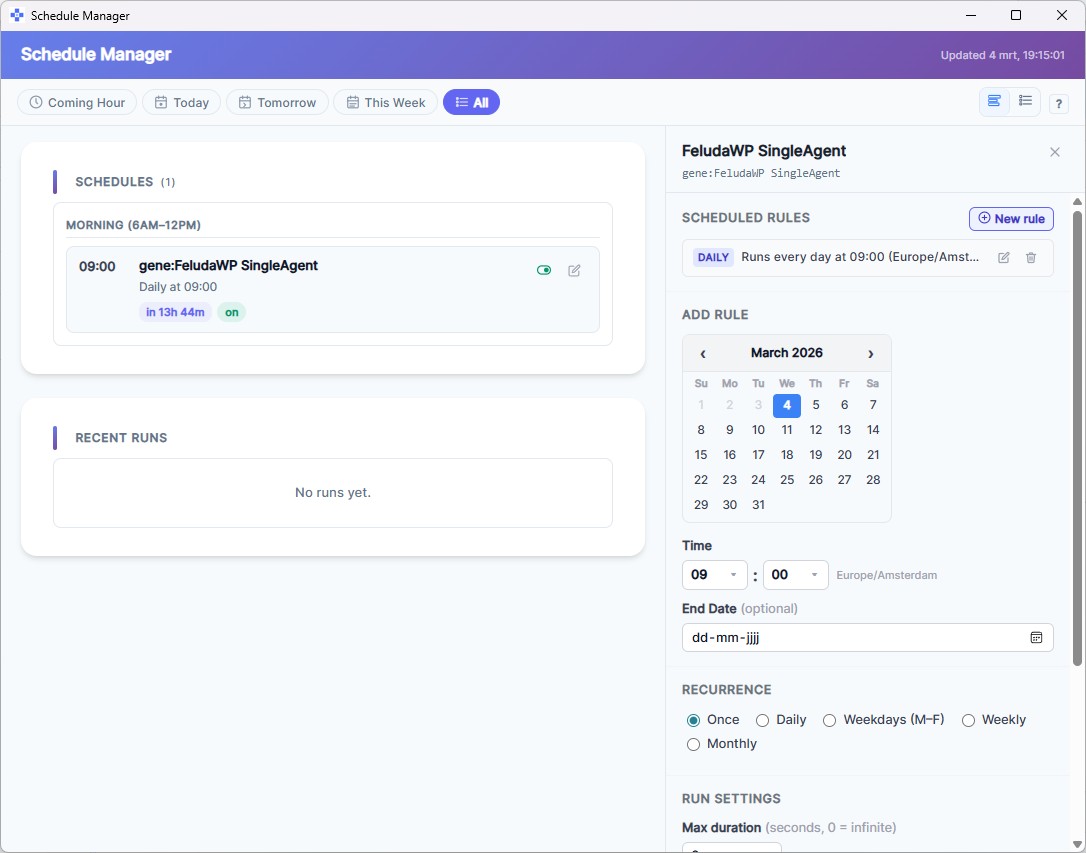
Every ChatGPT interaction requires you to type a prompt. Feluda's Schedule Manager runs your AI workflows automatically — hourly, daily, weekly — even when you are not at your computer.
Installable Capability Packages vs Starting From Scratch
With ChatGPT, you write (and re-write) prompts from scratch. Feluda has Genes — pre-packaged bundles of tools, prompts, and workflows you can install and use immediately from the Gene Store.
Feluda vs ChatGPT: Feature-by-Feature Comparison
Here is how the everyday ChatGPT experience compares to Feluda, feature by feature.
| Capability | ChatGPT / Chat-Style AI | Feluda |
|---|---|---|
| Multi-step workflows | No — one prompt, one response | Yes — visual drag-and-drop flow builder |
| AI provider choice | Locked to one provider | OpenAI, Anthropic, Mistral, local models, and more |
| Real tool use (web search, file access, APIs) | Limited — plugin ecosystem varies | Full MCP-based tool system with permissions |
| Runs on your desktop | No — cloud-only browser tab | Yes — Windows, macOS, Linux |
| Data stays on your machine | No — sent to provider's servers | Yes — fully local, offline-capable |
| Scheduled, unattended runs | No — requires manual prompting | Built-in Schedule Manager |
| Error handling and retries | No — conversation just stops | Typed error routing (rate limits, timeouts, content filters) |
| Classification and data routing | No — you manually read and sort | LLM Label blocks classify and route automatically |
| Structured data extraction | Manual — you paste text and ask | LLM Extract blocks with defined schemas |
| Use local AI models (Ollama, LM Studio) | No | Yes — zero API cost, complete privacy |
| Journaling tool for AI agents | No | Built-in journal tool — AI writes and reads entries |
| No code required | Yes | Yes — visual Studio interface |

When to Use ChatGPT vs When to Use Feluda
Both tools have their place. Here are real scenarios showing where each one shines.
Quick one-off question
"Summarise this paragraph" or "What is the capital of Finland?" A single prompt, a single answer — no workflow needed.
Classify 200 emails every morning
Build a flow that classifies emails into billing, support, and general. Schedule it to run at 7 AM daily. Enable the journal tool so the AI writes results as it works — zero manual effort.
Brainstorm blog post ideas
A creative back-and-forth with an AI chat works well for open-ended brainstorming sessions.
Generate blog + social posts + featured image from one brief
One input brief flows through multiple AI blocks: a writer, a social-media formatter, a tone classifier, and an image generator. One click produces a complete content package.
Translate a single sentence
Paste a sentence, get a translation. Simple and instant.
Extract names, dates, and amounts from 50 contracts
An LLM Extract block pulls structured data from unstructured documents, automatically and repeatably. No copy-pasting into a chat window fifty times.
Compare how three AI providers handle the same task
Build a flow with three parallel LLM blocks — OpenAI, Anthropic, and a local model. Run once, compare side by side. Or test interactively in the Workbench.
Keep sensitive data completely private
Use local AI models through Ollama or LM Studio. Your data never leaves your machine — not even to an API endpoint. No cloud tool can offer that.
Feluda Uses ChatGPT's Models — and More
Feluda is not a competitor to ChatGPT — it is a different category of tool. In fact, Feluda connects to OpenAI's models (the same technology behind ChatGPT) as one of many supported providers. You can use GPT-4o inside Feluda workflows alongside Anthropic Claude, Mistral, or a completely local model.
Think of it this way: ChatGPT is like texting a smart friend for advice. Feluda is like hiring that friend — along with several others — and giving them an office, tools, a schedule, and clear instructions to follow every day.
Frequently Asked Questions
How does Feluda differ from ChatGPT?
ChatGPT is a cloud-hosted chat interface for single-turn conversations. Feluda is a desktop application that lets you build multi-step AI workflows visually, connect multiple AI providers, give AI real tools to call, schedule automations, and keep all your data private on your machine.
Can Feluda use ChatGPT's models (GPT-4, GPT-4o)?
Yes. Feluda connects to OpenAI as one of many supported providers. You can use GPT-4, GPT-4o, and other OpenAI models inside Feluda workflows — alongside Anthropic Claude, Mistral, and local models running on your own machine.
Is Feluda a replacement for ChatGPT?
Feluda is not a chat replacement — it is a workflow platform. If you need a quick one-off answer, ChatGPT is fine. If you need to automate multi-step AI tasks, chain providers together, use real tools, schedule runs, and keep data private, Feluda is designed for exactly that.
Does Feluda send my data to the cloud?
No. Feluda runs entirely on your desktop. Your data, API keys, and secrets stay on your machine. You can use fully local AI models through Ollama or LM Studio for complete offline privacy — something no chat-style tool can offer.
Do I need to know how to code to use Feluda?
No. Feluda uses a visual drag-and-drop interface called Studio. You build AI workflows by placing blocks on a canvas and connecting them — no programming required.
Can I schedule AI tasks to run automatically?
Yes. Feluda includes a built-in Schedule Manager that lets you run AI workflows automatically — hourly, daily, weekly, or on specific dates. ChatGPT-style tools require you to be present and type each prompt manually.
Ready to go beyond chat? Download Feluda and start building AI workflows that run on your terms.