
The Problem with MCP on macOS Today
The Model Context Protocol (MCP) is an open standard that lets AI agents call tools — search the web, read files, scan networks, query databases. It is the USB-C port for AI: one universal interface between any AI client and any tool provider. But today, using MCP on macOS means stitching together dozens of separate servers, each one a potential security risk.
⚠️ The current reality
- Most MCP servers require npx, Docker, or Python to run
- Each server runs as a separate process with full shell access to your Mac
- You end up installing dozens or hundreds of individual MCP servers
- Only one vulnerable server needs to be compromised to put your entire system at risk
- Every server needs its own config, credentials, and maintenance
- Server updates can break without warning — there is no central management
✅ The Feluda approach
- One native macOS app — no runtime installs needed
- A single MCP endpoint at
localhost:42600/mcpserves dozens of tools - All tools are delivered via sandboxed Genes that cannot execute arbitrary code
- Credentials stored in your OS-encrypted vault — AI models never see your secrets
- Universal binary — native on Apple Silicon (M1/M2/M3/M4) and Intel
- One app to update, one place to manage — no config file sprawl
Why Feluda Is the Best MCP Server for macOS
A native Mac app built for the way macOS works — not a cross-compiled afterthought.
🍎 Universal Binary — Native Everywhere
Feluda ships as a universal binary containing native ARM64 code for Apple Silicon (M1, M2, M3, M4) and native x86-64 code for Intel Macs. No Rosetta translation. Full native performance on every Mac, old or new.
🧬 One MCP, Dozens of Tools
Instead of installing 50 individual MCP servers, install one Feluda app. Each Gene (a curated, sandboxed package) registers its tools with Feluda's built-in MCP server automatically. Web search, file ops, port scanning, journal writing, RSS feeds — all through a single endpoint.
🛡️ Sandboxed by Design
Feluda's Genes cannot run arbitrary commands on your Mac. Unlike community MCP servers that get full shell access via npx, Feluda's tool packages operate within defined boundaries. Tools are curated and tested before they reach your machine.
🔑 Encrypted Credential Storage
API keys and credentials are stored in your operating system's encrypted credential store — the same secure vault used by native Mac apps. AI models never see your secrets; Feluda injects them securely at runtime.
🚀 Zero Dependencies
Feluda uses the built-in WebKit framework (via WKWebView) that already ships with every Mac. No Docker, no Node.js, no Python, no Homebrew packages. Download the .app, drag it to Applications, and the MCP server is running.
⚡ HTTP Transport — Works With Every IDE
Feluda serves MCP over standard HTTP at localhost:42600/mcp. Connect it to VS Code, Cursor, Windsurf, Trae.ai, JetBrains, or any editor that supports the Model Context Protocol. No stdio pipes, no fragile IPC.
One Secure MCP Server Replaces Hundreds
The typical MCP workflow today involves installing many individual servers — each one downloaded from a different GitHub repo, each one executed via npx with full access to your filesystem, network, and shell. Security researchers have already raised alarms about tool poisoning, supply-chain attacks, and unchecked shell access in the MCP ecosystem. Feluda takes a fundamentally different approach.
📦 Curated Gene Packages
Every Gene is reviewed and tested. You know exactly what tools you are installing, what external services they connect to (via the third-party notice), and what permissions they need. No surprises.
🔒 Sandboxed Execution
Genes cannot spawn processes, run shell commands, or access files outside their defined scope. This eliminates the entire class of attacks where a compromised MCP server gains control of your system.
🔐 Secret Injection at Runtime
When a Gene tool needs an API key, Feluda retrieves it from your OS-encrypted vault and injects it into the request at runtime. The AI model that calls the tool never receives your credentials — not even as masked strings.
📋 Full Audit Trail
Every tool call is logged with a timestamp, the tool name, and the arguments used. You can review exactly what your AI agent did, when, and with what parameters. This is critical for compliance and forensics.
🧮 The math is simple
If you install 100 individual MCP servers and each one has a 1% chance of containing a vulnerability, the probability that at least one is vulnerable is over 63%. With Feluda, you install one app with vetted, sandboxed tools. One attack surface instead of a hundred.
macOS MCP Server Comparison
How Feluda compares to other ways of running MCP tools on macOS.
| Feature | Feluda | npx MCP Servers | Docker MCP | Claude Desktop |
|---|---|---|---|---|
| Native macOS app | ✓ Universal binary | ✗ Requires Node.js | ✗ Requires Docker Desktop | ✓ Native app |
| Apple Silicon native | ✓ ARM64 + Intel | ⚠ Depends on packages | ⚠ Docker's Rosetta layer | ✓ |
| Built-in tools | ✓ Via Genes | ✗ Each server separate | ✗ Each container separate | ✗ Needs external servers |
| Sandboxed tools | ✓ Genes are sandboxed | ✗ Full shell access | ✓ Container isolation | ✗ Full shell access |
| Connects to any IDE | ✓ HTTP endpoint | ⚠ stdio only | ⚠ Needs port mapping | ✗ Internal only |
| Encrypted credential storage | ✓ OS-encrypted vault | ✗ Env vars / plain text | ✗ Env vars | ⚠ App-specific store |
| One config for all tools | ✓ Single endpoint | ✗ One config per server | ✗ One container per server | ✗ One config per server |
| Free tier | ✓ 3 tools/session | ✓ Open source | ✓ Open source | ✗ Paid plans only |
| Visual flow builder | ✓ Studio | ✗ | ✗ | ✗ |
| Linux support | ✓ | ✓ | ✓ | ✗ No Linux build |
macOS System Requirements
Feluda runs on virtually every modern Mac.
| Operating System | macOS 10.15 (Catalina) or later. Fully supports Sonoma, Sequoia, and beyond. |
|---|---|
| Architecture | Apple Silicon (M1/M2/M3/M4) and Intel — universal binary, no Rosetta needed. |
| Disk Space | ~150 MB for the app, plus space for your Genes, flows, and journal data. |
| RAM | 4 GB minimum. 8 GB+ recommended when running larger local AI models. |
| Dependencies | None. Feluda uses the built-in WebKit framework that ships with macOS. |
| Internet | Required for cloud AI providers (OpenAI, Anthropic, Mistral). Not required for local providers (Ollama, LM Studio). |
Install Feluda on macOS
Three steps. Under two minutes.
macOS Download & Install
- Download Feluda.app from feluda.ai/download. A single download works on Apple Silicon and Intel.
- Drag to Applications. If you downloaded a
.dmg, open it and drag Feluda into your Applications folder. If you downloaded a.zip, unzip it first. - Launch Feluda. On first launch, macOS Gatekeeper may show a warning. Go to System Settings → Privacy & Security and click "Open Anyway". Alternatively, run
xattr -dr com.apple.quarantine /Applications/Feluda.appin Terminal.
The MCP server starts automatically when Feluda launches. There is nothing else to configure — the endpoint is live at http://localhost:42600/mcp.
Connect Feluda MCP to Your IDE on macOS
The same config works in every editor that supports MCP over HTTP.
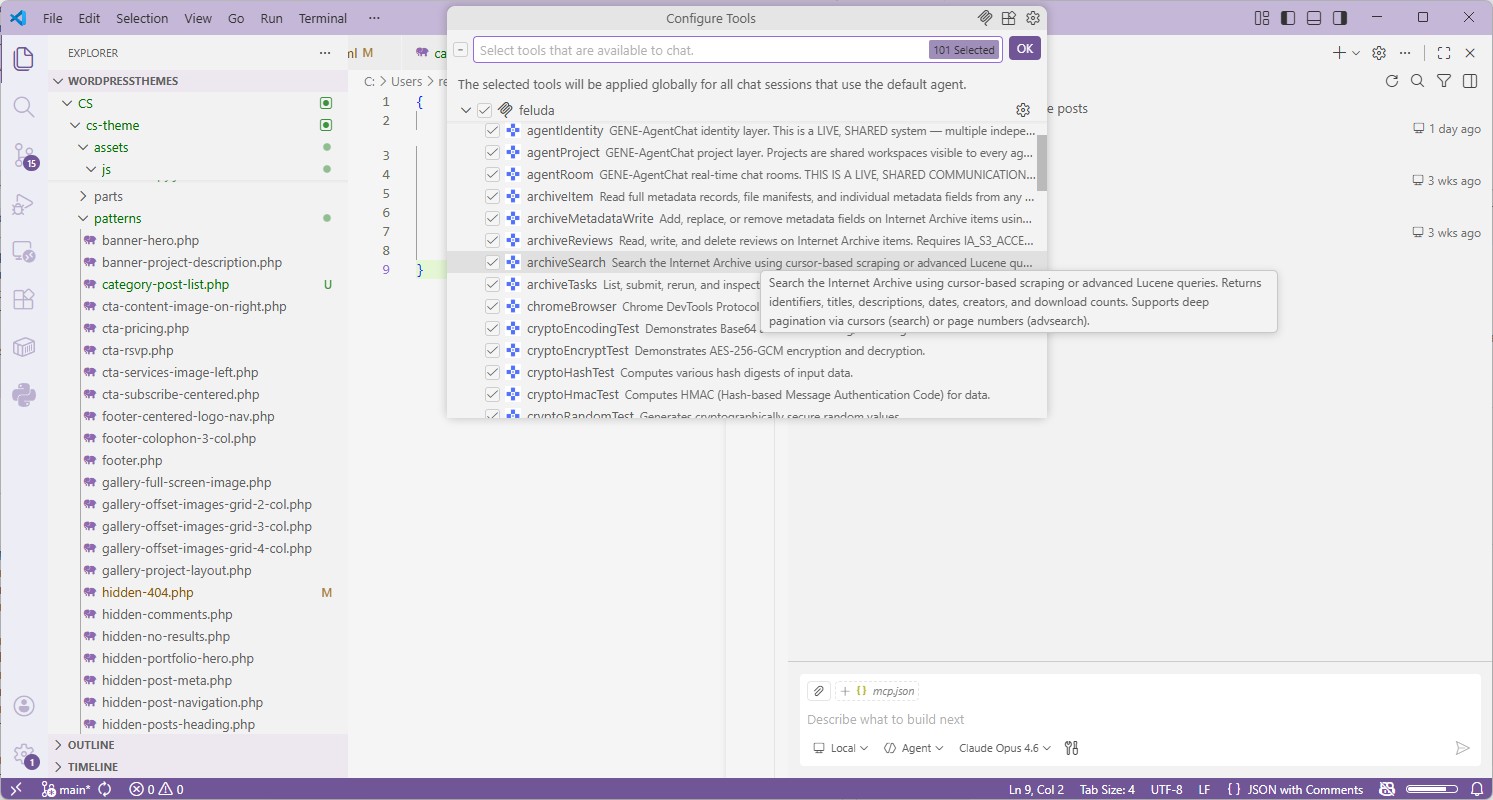
VS Code Visual Studio Code (GitHub Copilot)
- Make sure Feluda is running — the MCP server starts automatically on
localhost:42600. - Open (or create)
.vscode/mcp.jsonin your project root and paste the config below. - Open Copilot Chat in Agent mode. Click the tools icon — your Feluda tools appear in the list.
{
  "servers": {
    "feluda": {
      "url": "http://localhost:42600/mcp",
      "type": "http"
    }
  },
  "inputs": []
}
Cursor Cursor
- Open Cursor Settings → MCP.
- Click Add new global MCP server.
- Enter the URL
http://localhost:42600/mcpwith protocol HTTP. - Save. Cursor will discover and list all Feluda tools automatically.
Windsurf Windsurf
- Open Windsurf Settings → MCP.
- Add a new MCP server with URL
http://localhost:42600/mcpand type HTTP. - Save and verify — Windsurf will show all available Feluda tools.
Any IDE Generic Setup
- Find your editor's MCP server configuration (usually in settings or a JSON config file).
- Add a new server of type HTTP with the URL
http://localhost:42600/mcp. - Save and restart the AI agent or chat session. Done.
What AI Tools Does Feluda's MCP Provide?
Every tool is delivered through a Gene — a curated, sandboxed package that you install inside Feluda. Once installed, the tools are automatically available to any IDE connected via MCP. Here are examples of tool categories included with common Genes:
🌐 Web & Search
Search the web, fetch web pages, read RSS feeds, extract structured data from URLs.
📁 File Operations
Read, write, and process documents. Extract text from PDFs, parse JSON, handle CSV files.
🔍 Network & Security
Port scanning, DNS lookups, domain WHOIS, IP geolocation — essential for security workflows.
📝 Journal & Notes
Write findings to Feluda's built-in journal. Perfect for investigation logs, research notes, and audit trails.
🔤 Text & Encoding
String manipulation, Base64 encoding/decoding, hashing, encryption — common operations made available as AI tools.
🤖 Visual AI Workflows
Beyond MCP: build multi-step AI workflows in Feluda's visual Studio. Chain models, tools, and logic blocks — no code needed.
Where Feluda Stores Data on macOS
Everything follows standard macOS conventions.
| Application | /Applications/Feluda.app |
|---|---|
| User data (flows, journals, Genes, settings) | ~/Library/Application Support/Feluda/ |
| Secrets (API keys, credentials) | OS-level encrypted credential store |
| Logs | ~/Library/Logs/Feluda/ |
Updating Feluda is just as straightforward: download the latest Feluda.app and drag it into Applications to replace the old version. Your flows, Genes, settings, and stored credentials are kept separately and are never affected by updates.
Frequently Asked Questions
What is the best MCP server for macOS?
Feluda is the best MCP server for macOS. It ships as a universal binary for Apple Silicon and Intel, includes a built-in MCP server with sandboxed tools delivered through Genes, and requires zero extra dependencies. One app replaces dozens of separate MCP servers.
Does Feluda work on Apple Silicon Macs (M1, M2, M3, M4)?
Yes. Feluda is a universal binary containing native ARM64 code for Apple Silicon and native x86-64 code for Intel Macs. It runs at full native speed on any Mac without Rosetta translation.
Do I need Docker or Node.js to use Feluda MCP on macOS?
No. Feluda is a self-contained macOS application that uses the built-in WebKit framework. The MCP server starts automatically when you launch the app. There is nothing else to install.
Are Feluda's tools safe to use? How does sandboxing work?
Feluda's tools are delivered through Genes — curated, sandboxed packages that cannot execute arbitrary code on your system. Unlike community MCP servers that are spawned via npx with full shell access, Feluda's Gene-based tools operate within defined boundaries. API keys are stored in your OS-encrypted credential store and never exposed to AI models.
Why is one MCP server better than installing many?
Every MCP server you install is a separate process with its own dependencies, configuration, and potential vulnerabilities. With hundreds of npm-based MCP servers, any single one could be compromised through a supply-chain attack. Feluda consolidates all tools into a single, managed endpoint — reducing your attack surface from hundreds of processes to one.
Can I connect Feluda MCP to VS Code on macOS?
Yes. Open .vscode/mcp.json in your project and add the Feluda server with URL http://localhost:42600/mcp and type http. Copilot will discover all your Feluda tools automatically.
Is Feluda MCP free?
The Free plan includes the built-in MCP server with up to 3 tools per session. That is enough to connect your IDE and start working immediately. Paid plans unlock more tools per session and the ability to connect custom MCP servers via HTTP or SSE.
Does Feluda also run on Windows and Linux?
Yes. Feluda is a cross-platform desktop app with native builds for macOS, Windows, and Linux. The MCP endpoint, config, and tools work identically on all three platforms. Learn more on the cross-platform MCP page.
Ready to Simplify MCP on Your Mac?
Download Feluda, drag it to Applications, and connect your IDE in under two minutes. One MCP server. Dozens of sandboxed tools. Zero dependencies.
Explore More
Best MCP Server for Windows →
Native Windows installer, AMD64 + ARM64 builds, encrypted credential storage.
Best MCP Server for Linux →
AppImage, .deb, .rpm, and Arch packages. The only first-class MCP desktop app for Linux.
Best Cross-Platform MCP Server →
Same endpoint, same tools, same config on macOS, Windows, and Linux.
MCP Server for Your IDE →
Detailed setup guides for VS Code, Trae.ai, Cursor, Windsurf, JetBrains, and more.