
GENE-TWITTER connects your AI assistant and Feluda Flows directly to Twitter (X) using secure OAuth 2.0 user authentication. Search recent tweets, look up user profiles, fetch tweet details, retrieve a user's timeline, and send tweets — all from within your Feluda application. Whether you are tracking conversations, monitoring topics, automating social monitoring, or building a content pipeline that publishes to Twitter, GENE-TWITTER gives your AI the live access it needs.
What can I do with GENE-TWITTER enabled?
Once connected to your Twitter developer app, your AI can interact with Twitter in real time. It can search for recent tweets by keyword, resolve a Twitter username to a full profile, look up individual user accounts or specific tweets by ID, retrieve a user's latest tweets from their timeline, and post new tweets on your behalf. All activity is logged locally, so your AI always has history to work with — and everything runs directly from your Feluda application with no third-party relay.
What operations does GENE-TWITTER support?
GENE-TWITTER exposes a single, capable Twitter tool that covers the full range of everyday Twitter interactions. Every operation supports calling it with help to instantly receive a plain-language description of what it does, what parameters it accepts, and example uses — so your AI always knows exactly how to call it.
| Operation | What it does |
|---|---|
| help | Lists all available operations, parameters, settings, and secrets in a single readable response. Your AI calls this first whenever it needs a quick reference to how the tool works. |
| oauth_setup | Returns a complete step-by-step guide for creating your Twitter developer app and configuring OAuth 2.0. A new user can follow this guide from start to finish without leaving their Feluda application. |
| search | Searches recent tweets by keyword or phrase. Returns tweet IDs, text, timestamps, and author IDs. Ideal for topic monitoring, brand mention tracking, or pulling live discussion into your AI workflow. |
| resolve_username | Takes a Twitter username and returns the full account profile including the numeric user ID, display name, bio, follower counts, and public metrics. Also triggers OAuth authorization if this is your first use — a browser window will open once for you to consent. |
| user_by_id | Looks up a Twitter account by its numeric user ID and returns detailed profile information including creation date, profile image, follower and following counts, and verification status. |
| tweet_by_id | Retrieves a specific tweet by its ID, including the text, author, language, creation time, and engagement metrics. |
| user_tweets | Returns the most recent tweets from a specific user's timeline. You can provide either a numeric user ID or a username — if you provide a username, the tool resolves it to a user ID automatically before fetching the timeline. |
| send_tweet | Posts a new tweet on behalf of the authenticated user. Requires the posting permission to be explicitly enabled in gene settings — it is off by default, so your AI cannot post anything without your deliberate approval. |
Requirements and compatibility
Before getting started, here is what you need. GENE-TWITTER uses the official Twitter v2 API and requires a Twitter developer account with an OAuth 2.0 app configured. The gene handles the full authorization flow — a browser window opens once when you first use it, you approve access, and the token is stored securely on your device for all future calls.
- Twitter developer account: You need a free Twitter developer account to create an app and generate OAuth 2.0 credentials. Approval is typically instant for standard access on a new account.
- Twitter developer app: You must create an app in the Twitter Developer Portal and enable OAuth 2.0 with Read and Write permissions. The oauth_setup operation walks you through every step in plain language.
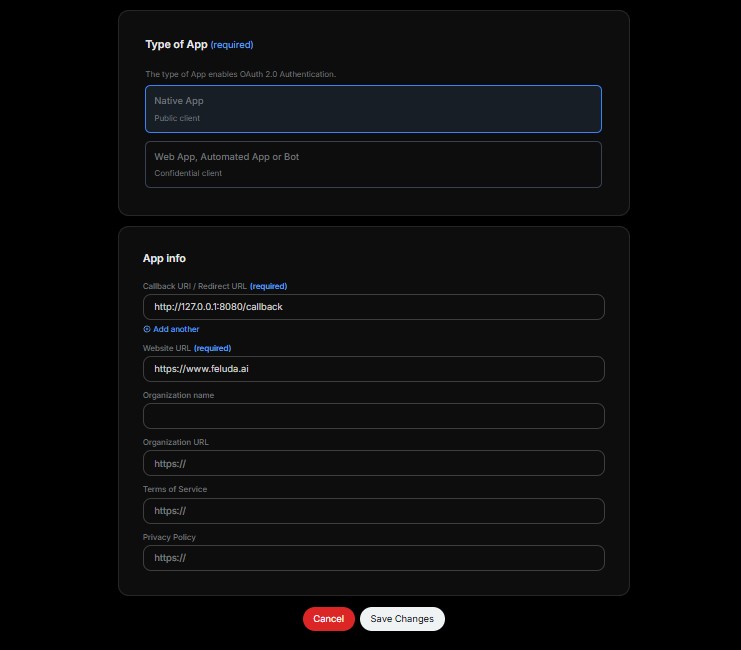
- Native App type: Your Twitter developer app must be configured as a Native App. This is required for the local OAuth callback to work correctly.
- Callback URL: The callback URL in your Twitter app must be set exactly to
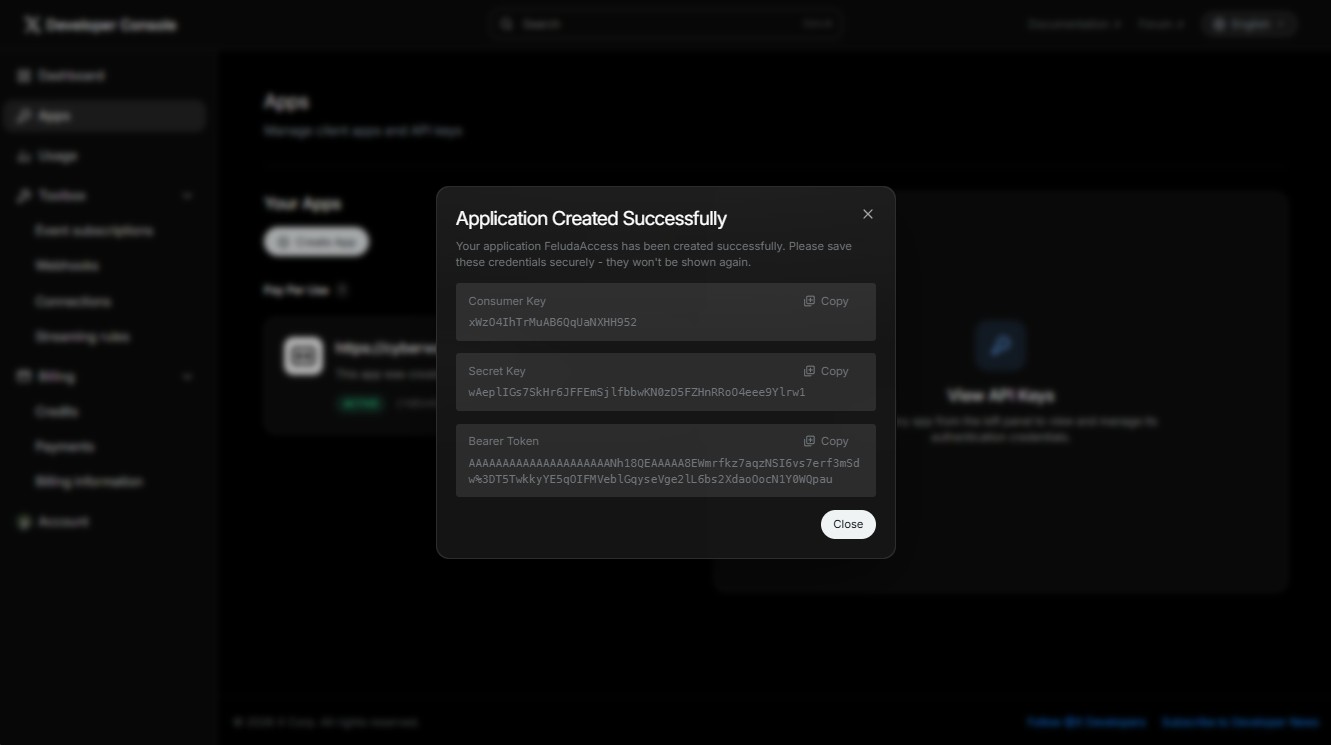
http://127.0.0.1:8080/callback. This is the address that the Feluda local OAuth listener uses to receive the authorization response. It must match exactly — no trailing slash, no HTTPS. - OAuth 2.0 credentials: After creating the app, Twitter gives you a Client ID and a Client Secret. Both must be saved in the Feluda Secrets page.
- Feluda Desktop App: GENE-TWITTER runs inside the Feluda Desktop App. You need a Feluda account and the desktop app installed to use this gene.
What GENE-TWITTER does not do
Understanding what is out of scope helps you plan correctly and set the right expectations before building a workflow.
- Does not support direct messages: The Twitter v2 API requires elevated API access for direct messages. GENE-TWITTER does not support DM reading or sending.
- Does not manage lists or bookmarks: Twitter list management, bookmarks, and similar account management features are not included in this gene.
- Does not support multiple simultaneous accounts: The gene is designed to work with one authenticated account at a time. Each call uses the session configured by your default session setting.
- Does not upload images or media: GENE-TWITTER posts text-only tweets. Media uploads (images, GIFs, videos) are not supported.
- Does not access private or protected accounts: The gene can only retrieve public profile information and tweets. Private or protected accounts are not accessible through the Twitter v2 API at the standard access level.
- Does not operate on historical tweets beyond 7 days: The recent tweet search is limited to the past 7 days at the standard API access tier. Full archive search requires Twitter's Academic/Elevated access.
How to set up GENE-TWITTER — step by step
Getting started requires creating a Twitter developer app and saving your credentials in Feluda. The gene includes a built-in setup guide you can call at any time — just ask your AI to run oauth_setup and it will walk you through every step in plain language. The summary below covers the key stages.
Step 1 — Create a Twitter developer account
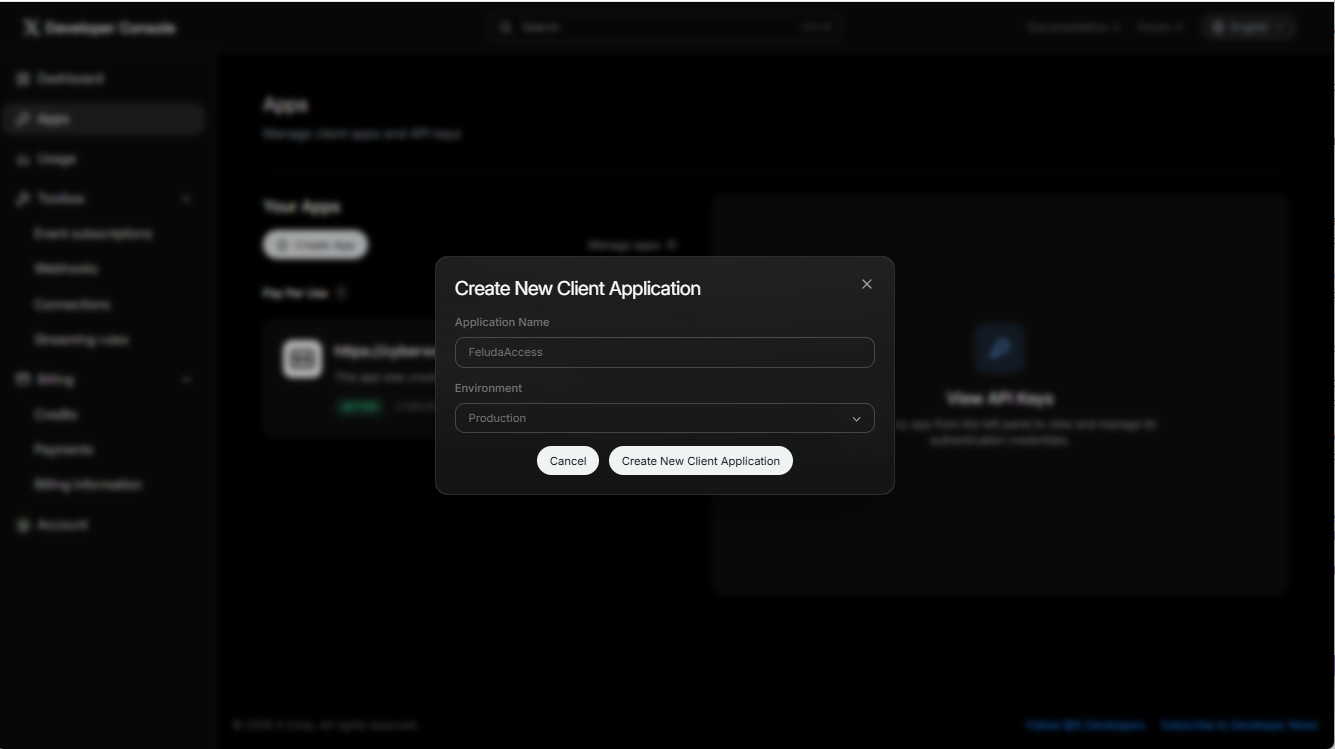
- Go to
https://developer.twitter.comand sign in with your Twitter account. - Apply for a developer account if you have not already done so. Standard access is approved quickly.
- Once approved, open the Developer Portal dashboard.
Step 2 — Create a new app with OAuth 2.0
- In the Developer Portal, go to Projects and Apps, then click Add App.
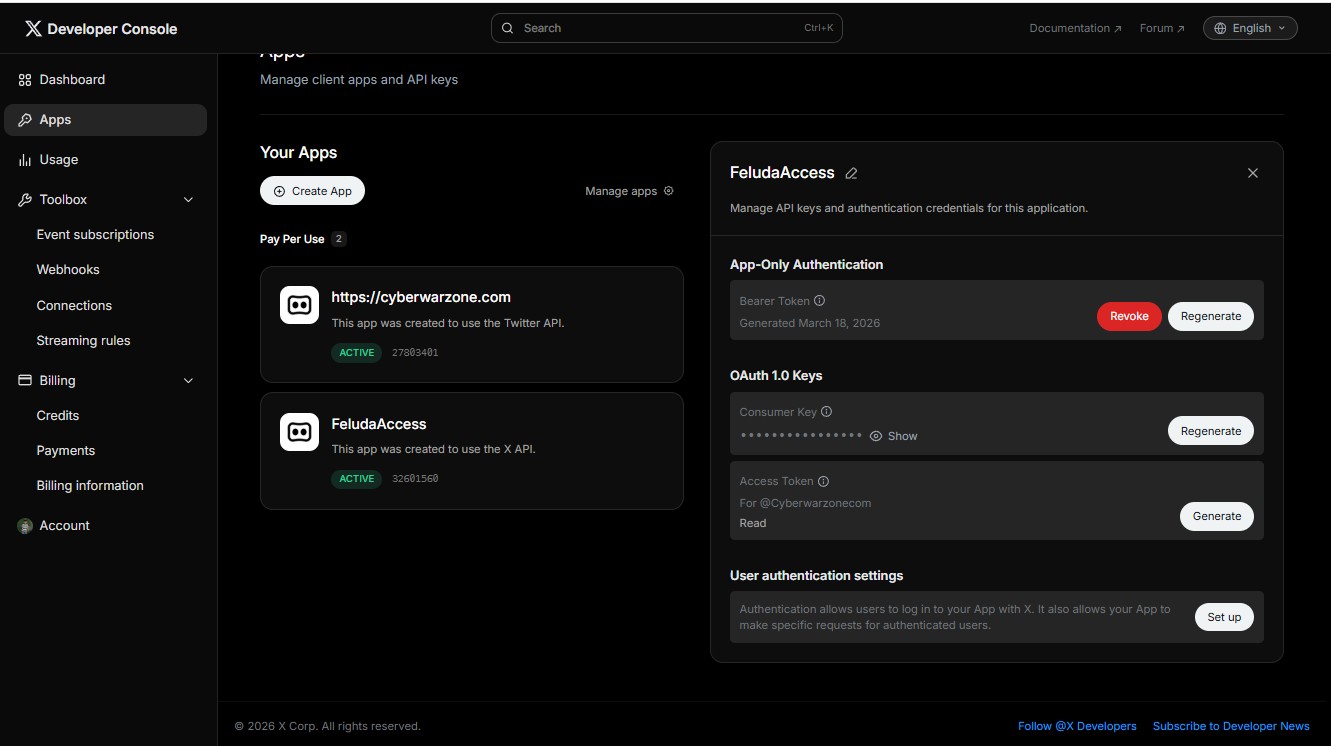
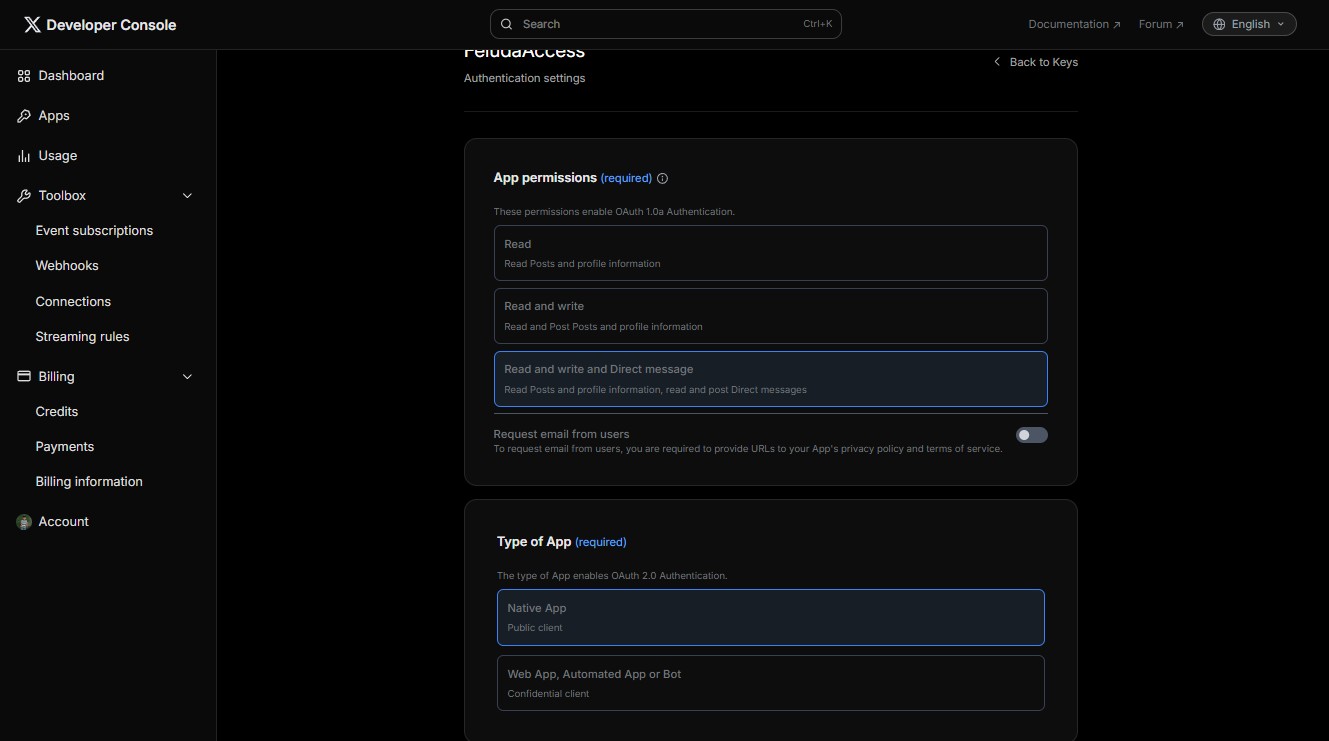
- Open User Authentication Settings and enable OAuth 2.0.
- Set app permissions to Read and Write.
- Set the app type to Native App.
- Set the Callback URI to exactly:
http://127.0.0.1:8080/callback - Add any valid website URL (for example
https://example.com) and save.
Step 3 — Save your credentials in the Feluda Secrets page
Open the Feluda Desktop App and navigate to the Feluda Secrets page. Add the following two secrets:
TWITTER_CLIENT_ID— the OAuth 2.0 Client ID shown in your Twitter developer app.TWITTER_CLIENT_SECRET— the OAuth 2.0 Client Secret shown when you created your app. The secret is displayed only once — copy it immediately.
Step 4 — Configure gene settings
Open the Feluda Settings page for GENE-TWITTER and fill in the following:
| Setting | Required | Description |
|---|---|---|
Twitter_DefaultSessionId |
Required | Your Twitter username without the @ symbol. This identifies which account the gene authenticates as and where the OAuth token is stored. |
Twitter_AllowSendTweet |
Optional | Controls whether the AI is allowed to post tweets. Must be set to true before send_tweet will work. Off by default — your AI cannot post anything until you explicitly enable this. |
Twitter_DefaultSearchLimit |
Optional | Default number of results returned per search or timeline query. Defaults to 10. Can be overridden per call using the count parameter. |
Twitter_MaxPostRetries |
Optional | Maximum number of automatic retries on rate limit or server errors when sending a tweet. Defaults to 2. |
Step 5 — Authorize
- Ask your AI to run resolve_username with your Twitter username.
- A browser window will open — sign in to Twitter and click Authorize.
- The gene stores the OAuth token securely. All future calls reuse it automatically — the browser will not open again unless the token expires.
Your credentials stay on your device
Security is a priority, especially when connecting an AI tool to a live social media account. Here is exactly how GENE-TWITTER handles your credentials and tokens.
- Stored locally, not in the cloud: Your
TWITTER_CLIENT_IDandTWITTER_CLIENT_SECRETare stored in the Feluda Secrets page on your own device. They are never uploaded to any server or shared with any third party. - OAuth token stays on your device: After you authorize the app, the OAuth access token is stored locally by the Feluda runtime. It is never passed through any external relay — requests go directly from your device to the Twitter API.
- You can revoke access at any time: In the Twitter Developer Portal or your Twitter account's Connected Apps page, you can revoke authorization for your app immediately. The gene will stop working until you re-authorize. This gives you full control at all times.
- No middleware, no proxy: GENE-TWITTER communicates directly with the official Twitter v2 API endpoints. There is no Feluda server, relay, or proxy involved in any API call.
Tweet posting — you stay in control
GENE-TWITTER is designed so that your AI can never post a tweet accidentally. Posting is fully locked behind a setting that must be explicitly enabled. Until you turn it on, the AI can read, search, and look up anything on Twitter — but it cannot post.
- Sending tweets is off by default: The
Twitter_AllowSendTweetsetting is set to false when you first install the gene. Your AI will receive a clear error if it tries to post while this setting is off. - Explicit opt-in required: To allow posting, you must go to the Feluda Settings page and set
Twitter_AllowSendTweetto true. This is a deliberate, conscious action — not something that can happen by accident. - Tweet length is enforced: The gene checks that tweet text does not exceed 280 characters before making any API call. Oversized tweets are rejected with a clear error before they ever reach Twitter.
- Automatic retry on rate limits: If Twitter temporarily rate-limits a tweet submission, the gene will retry automatically up to the number of times configured in
Twitter_MaxPostRetries. Permanent errors (authorization failures, invalid content) are never retried.
Best practices and recommendations
A few simple habits will make your experience with GENE-TWITTER more consistent and reliable from the start.
- Authorize before building a flow: Complete the OAuth authorization step (Step 5 above) manually before trying to use GENE-TWITTER inside a Feluda Flow. Authorization requires a browser interaction — once that is done, flows and agents can work unattended.
- Keep posting disabled until ready: Leave
Twitter_AllowSendTweetset to false while you are exploring the gene, testing searches, or building your workflow. Only enable it when you are ready to post in production. - Use resolve_username as a connectivity check: Before starting a long session, ask your AI to run resolve_username with your username. It confirms the OAuth token is valid and the connection is working — a quick check that saves interruption mid-session.
- History is stored automatically: Every successful API call is automatically logged to a local history database on your device. Your AI builds a growing record of searches, profiles, and tweets it can reference without making repeated API calls — no extra step required.
- Mind the 7-day search window: The recent tweet search only reaches back 7 days at the standard API tier. If your workflow relies on searching older content, set up regular scheduled searches and store the results locally so your AI has the history it needs.
Handy things to ask your AI
These are ready-to-use prompts you can type directly to your AI in any Feluda Flow that includes GENE-TWITTER. Copy them as-is or adapt the wording to suit your style — your AI will know exactly what to do.
| What you want to do | What to say to your AI | What happens |
|---|---|---|
| Check setup guide | Show me the Twitter OAuth setup guide. |
Returns the full step-by-step guide for creating your Twitter developer app and configuring the gene — no documentation needed. |
| Verify your connection | Look up my Twitter profile for @yourusername and confirm the connection is working. |
Resolves your username, confirms OAuth is active, and returns your profile details — a reliable first check before any session. |
| Search tweets | Search Twitter for recent tweets about [topic] and show me the top results. |
Runs a recent tweet search and returns matching tweets with text, timestamps, and author IDs. |
| Look up a user | Find the Twitter profile for @username and give me their bio, follower count, and user ID. |
Resolves the username and returns the full account profile with all public metrics. |
| Get someone's latest tweets | Show me the last 10 tweets from @username. |
Fetches the user's most recent timeline tweets including text, timestamps, and engagement metrics. |
| Look up a specific tweet | Get the details for tweet ID [id] including engagement stats. |
Retrieves the full tweet record including text, author, language, creation time, and like/retweet counts. |
| Send a tweet | Send a tweet saying: [your tweet text]. |
Posts the tweet to Twitter from the authenticated account. Requires Twitter_AllowSendTweet to be set to true in settings. |
| Monitor a keyword | Search Twitter for [keyword] and summarize what people are saying right now. |
Pulls recent tweets matching the keyword and lets your AI synthesize the current conversation into a short summary. |
| Compare today vs yesterday | Search Twitter for [topic] and compare the results to what you found in the last session. |
Runs a fresh search and lets your AI compare the live results against the automatically stored history from previous searches — useful for spotting shifts in volume or sentiment over time. |
Built-in help for every operation
Every operation in GENE-TWITTER has a built-in help response. When your AI or a Feluda Flow calls the tool with the help operation, it immediately receives a clear description of all available operations, every parameter it accepts, the settings it reads, and the secrets it requires. This means your AI never has to guess. It can always ask the tool to explain itself before using it — especially useful when setting up a new flow or onboarding a new AI model.
How GENE-TWITTER works inside Feluda Flows
GENE-TWITTER becomes especially powerful when used inside Feluda Flows. By combining Twitter access with other genes and AI logic, you can build automated social intelligence pipelines that run continuously without manual intervention.
- Topic monitoring flows: Build a flow that searches Twitter for a keyword or brand mention on a schedule, summarizes the results, and stores a daily snapshot of the conversation. Your AI can compare today's results with yesterday's archived data to spot emerging trends or new voices in the discussion.
- Profile research flows: Create a flow that takes a list of Twitter usernames, resolves each one to a full profile, and produces a structured report of follower counts, bio summaries, and public metrics — all in one automated pass.
- Content publishing flows: Build a multi-step flow that drafts tweet content using your AI, checks the character count, verifies the posting permission is enabled, and sends the tweet — reducing your publishing process to a single trigger with a review step in the middle.
- Conversation snapshot flows: Use a flow to fetch the latest tweets from key accounts in your industry every day and store them locally. Your AI builds a growing archive of their messaging that it can analyze, compare, or summarize on demand.
- Cross-gene flows: Combine GENE-TWITTER with other genes in your Feluda application. For example, search Twitter for a topic, fetch a referenced article URL using a web reader gene, summarize the article, and then compose a tweet response — all as a single connected Feluda Flow.
GENE-TWITTER gives your AI a live, authenticated window into real-time Twitter conversations, profile data, and tweet history — turning social media intelligence into a native capability of your Feluda-powered automation.
Real-world stories
Here is how different users put GENE-TWITTER to work every day.
- The solo creator: A content creator uses GENE-TWITTER to monitor Twitter for questions and conversations around their niche topic. Every morning their Feluda Flow runs a keyword search, surfaces the most interesting tweets, and prepares a short briefing. The creator reviews it, picks the threads worth engaging with, and has their AI draft responses for review before anything is posted.
- The market researcher: An analyst uses GENE-TWITTER to track competitor account activity. A scheduled flow fetches the latest tweets from a curated list of accounts, stores each batch with a timestamp, and builds a growing archive the analyst can query at any time. The AI can summarize changes in messaging or flag new announcements in seconds.
- The community manager: A small brand uses GENE-TWITTER to keep an eye on mentions of their product name. A Feluda Flow searches for the keyword several times a day, archives the results, and surfaces any sentiment shift or spike in volume. The community manager is always the first to know when a conversation about their brand starts picking up momentum.
- The newsletter curator: A newsletter writer uses GENE-TWITTER to source fresh quotes and reactions from key voices in their industry. Each week they ask their AI to search for recent tweets on the issue they are covering, pull the most relevant ones by engagement, and compile them into a formatted snippet ready to drop into the newsletter draft.
Not seeing GENE-TWITTER in your Feluda Desktop App?
If you have just installed or updated GENE-TWITTER and it does not appear in your Feluda Desktop App yet, follow these two steps to bring everything up to date.
- Step 1 — Synchronize: Open the Feluda Desktop App and click the Synchronize button. This tells the app to check for new and updated genes. Synchronizing usually takes just a few seconds and will make newly installed genes available immediately.
- Step 2 — Restart the app if needed: If GENE-TWITTER still does not appear after synchronizing, close and reopen the Feluda Desktop App. A full restart reloads all genes from scratch and resolves any cases where the app did not pick up the change automatically.
These two steps solve the vast majority of cases where a gene does not show up straight away after installation or an update.
Why choose GENE-TWITTER
- OAuth 2.0 PKCE — the secure standard: GENE-TWITTER uses the current recommended OAuth 2.0 PKCE flow for native apps. Your credentials are never exposed in URLs and the authorization is handled entirely through the official Twitter consent screen.
- Safe by default: Tweet posting requires an explicit opt-in. Your AI can explore, research, and read Twitter freely without any risk of unintended posts until you deliberately enable it.
- Instant discoverability: Every operation answers a help request. Your AI can always ask the tool to explain itself without any documentation — making GENE-TWITTER easy to use in any flow, with any model.
- Local history built in: Every successful API response is automatically archived locally. Your AI builds a growing history of searches, profiles, and tweets it can reference without making repeated API calls.
- Real-time Twitter intelligence: Unlike static datasets or scraping workarounds, GENE-TWITTER connects directly to the official Twitter v2 API using your own authenticated account — giving your AI access to live, accurate, up-to-date data.
Add GENE-TWITTER to your Feluda application today and give your AI a live, authenticated connection to Twitter. Save your credentials in the Feluda Secrets page, set your username in the Feluda Settings page, run the oauth_setup guide to configure your developer app, and your AI is ready to search, research, monitor and post — all from one place.
Resources
Media

Frequently Asked Questions
- Will the browser open every time I use the gene?
- No. The browser opens only once during the initial OAuth authorization. After you approve access and the token is stored, all future calls happen silently in the background. The browser will only open again if the token expires or is revoked.
- Can my AI post tweets without my knowledge?
- Only if you explicitly set Twitter_AllowSendTweet to true in the gene settings. This setting is false by default and must be consciously changed by you. Your AI will receive a clear blocked error if it tries to post while the setting is off.
- Is my Twitter password ever shared with Feluda?
- No. GENE-TWITTER uses OAuth 2.0 — you authorize the app by clicking Approve in the official Twitter login page. Your Twitter password is entered directly on Twitter's own website and is never seen, stored, or transmitted by Feluda or GENE-TWITTER.
- What happens if my OAuth token expires?
- GENE-TWITTER uses refresh tokens to automatically extend access. If the token does expire, simply run resolve_username again — it will open the browser authorization once more and store a fresh token.
- Can I use this for multiple Twitter accounts?
- Each gene instance authenticates as one account at a time, set by the Twitter_DefaultSessionId setting. The session_id parameter can be used to indicate a specific session per call, but managing multiple simultaneous accounts requires separate configuration.